Customer Follow-Up Software: Manage Every Follow-Up in One Place
“Please call me next week.” Every sales and support team hears this many times a day. But when the promise lives in a notebook, a WhatsApp chat or an agent’s memory, the call often does not happen. The customer waits, loses interest, and may choose a competitor. Using customer follow up software, teams can record each promise, set a date and get reminded at the right time.
This guide explains what customer follow-up software is, which features matter, how to build a simple follow-up process and what mistakes to avoid.
What Is Customer Follow-Up Software?
Customer follow-up software is a tool that helps teams schedule, track and complete follow-ups with leads and customers. It stores contact details and conversation history, sets reminders for callbacks or messages, and alerts managers when follow-ups are overdue, so no customer is forgotten.
Many businesses use a CRM for this. A CRM (Customer Relationship Management) system keeps lead and customer records in one place. For teams that work mainly by phone, a telecaller CRM adds calling features, such as call logs and outcomes, next to the follow-up schedule.
Why Follow-Ups Get Missed
Follow-ups fail for practical reasons, not because agents do not care. The most common causes are:
- Scattered records. Notes are in personal diaries, phones, Excel sheets and chats.
- No fixed next step. The call ends without a date for the next contact.
- Too many leads per agent. Without priority, urgent callbacks are buried.
- Agent turnover. When someone leaves, their pending follow-ups go with them.
- No manager visibility. Nobody knows how many callbacks are pending or overdue.
Each problem can be reduced with a clear process supported by the right software.
Follow-Up Software vs Spreadsheets vs Full CRM
| Option | Good for | Limitations |
|---|---|---|
| Spreadsheet | Very small teams with few leads | No automatic reminders, easy to overwrite, weak history |
| Reminder or to-do app | Individual users | Not connected to lead data or team reporting |
| CRM with follow-up features | Sales, admissions and support teams | Needs setup and regular use by the team |
| Telecaller CRM | Phone-driven teams | May offer less for non-calling workflows |
Choose the simplest option that your team will use every day. A basic tool that everyone updates is better than a complex one that nobody trusts.
Key Features to Look For
1. Follow-up scheduling with reminders
Agents should set a date and time for the next contact in a few clicks. Reminders should appear when the time comes, and overdue follow-ups should be clearly marked.
2. Complete conversation history
Before every follow-up, the agent should see previous calls, notes and outcomes. This helps them continue the conversation instead of starting again.
3. Recurring follow-ups
Some customers need regular contact, such as renewal reminders or periodic check-ins. Recurring schedules save repeat work.
4. Lead status and stages
Every lead should sit in a clear stage, such as new, contacted, interested, follow-up or closed. Filters help agents work through their list in order.
5. Call logging and recordings
For teams that follow up by phone, calls should be logged with duration, outcome and notes.
6. Messaging options
A WhatsApp, SMS or email message after a call keeps the customer informed, especially if they did not answer.
7. Assignment and reassignment
Leads should have a named owner. When an agent is absent or leaves, a manager should be able to reassign pending work quickly.
8. Manager dashboards and reports
Look for views of pending, completed and overdue follow-ups by agent, and reports on how many follow-ups lead to a next stage.
9. Mobile access
Field teams and remote agents should be able to check and complete follow-ups from their phones.
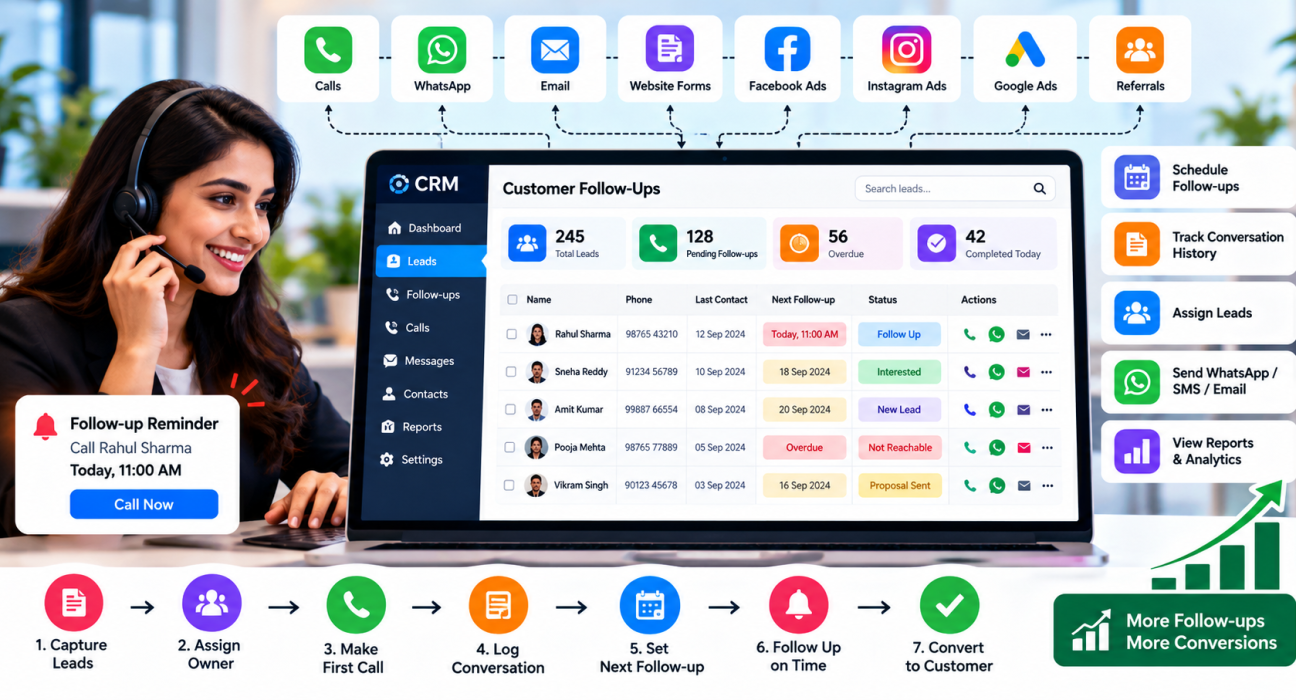
A Simple Follow-Up Process You Can Use
This workflow can be set up in most tools.
- Record every enquiry. Import or capture leads in one system, not in personal notes.
- Assign an owner. Every lead should have one responsible person.
- Make the first call quickly. Set a team target for first contact.
- Log the outcome. Write what was discussed, the customer’s need, budget and timeline.
- Set the next follow-up before ending the call. Choose a date the customer agrees with.
- Follow up on time. Check the history first and refer to the last conversation.
- Change channel if needed. If calls go unanswered, send a short message and try again later.
- Close or move the lead. After a fixed number of unsuccessful attempts, mark the lead as closed or move it to a longer-term list.
- Review weekly. Managers should check overdue follow-ups and lost-lead reasons.
Examples by Industry (Hypothetical)
These examples are illustrative, to show how follow-ups work in practice.
- Insurance: An agent quotes a policy and the customer says they will decide after their salary date. The agent schedules a call for that date. Later, a renewal reminder is set for one month before expiry. Teams can see how this fits an insurance CRM workflow.
- Healthcare: A clinic’s front desk calls patients to remind them of check-ups or confirm appointments. A callback list makes sure patients who did not answer are called again. This is relevant to a healthcare CRM setup.
- Education: A counsellor speaks to a parent who wants to visit the campus next month. A follow-up is set for the week before, with a WhatsApp reminder about the visit. This suits an education CRM process.
- Real estate: A buyer says they are waiting for loan approval. The agent sets a follow-up for the expected approval date.
In each case, the value comes from a clear next step with a date, not from the software itself.
Benefits of Managing Follow-Ups in One Place
- Fewer missed callbacks. Reminders replace memory.
- Better customer experience. Customers get calls when promised, and agents know the context.
- Smoother handovers. Notes and history stay with the lead, not the agent.
- Manager visibility. You can see pending and overdue work without asking each agent.
- Cleaner pipeline. Leads that are not moving can be closed instead of cluttering the list.
Limitations to Keep in Mind
- Software cannot replace good conversations. A reminder only tells the agent to call, and the quality of the call still matters.
- The data is only as good as the notes. If agents skip logging, reports will be misleading.
- Too many reminders can cause alert fatigue. Keep the process simple.
- Not every follow-up should be a call. Some customers prefer WhatsApp or email.
Common Mistakes to Avoid
- Ending calls without a next date. “I will call you sometime” is not a follow-up.
- Following up too often. Repeated calls in a short time annoy customers.
- Ignoring consent and DND rules. Check current Indian regulations for calls and messages before contacting customers at scale.
- Using the same message for everyone. A renewal reminder and a first-time enquiry need different approaches.
- Not reviewing overdue items. If nobody checks them, the system becomes a list of ignored alerts.
- Choosing tools by feature count. Pick based on your workflow and team habits.
How TeleCallingCRM Can Help
TeleCallingCRM is a CRM built for telecalling and outbound sales teams in India. Based on the information on its website, these capabilities are relevant to follow-up management:
- Follow-up scheduling: Callback scheduling with reminders, overdue alerts and recurring follow-ups.
- Call tracking: Every call is logged with duration, outcome, recording and notes.
- Lead management: Import, assignment, tracking and lead scoring, with de-duplication and DNC checks.
- Automations: Rules to auto-assign leads, schedule follow-ups, send WhatsApp nudges and alert managers when a stage changes.
- Pipeline: Custom stages and deal values.
- Messaging: WhatsApp templates, SMS and email.
- Team monitoring and reports: Analytics by agent, leaderboards and a live view of team activity.
- Mobile app: Agents can call, log outcomes and manage follow-ups from their phones.
- AI call analysis: Transcripts, summaries and action items after calls.
It is designed mainly for calling-led teams. If your follow-ups are mostly by email or need project management, check whether it fits before deciding. Features and plans can change, so verify current details and try it with real data.
How to Choose Customer Follow-Up Software
Ask these questions:
- Can agents set a follow-up in a few clicks during or right after a call?
- Can managers see overdue follow-ups across the team?
- Is conversation history easy to find before each call?
- Does it work on mobile?
- Does it connect to where your leads come from?
- Is pricing clear and suitable for your team size?
- Is there a trial so you can test with real leads?
Try a shortlist with one small team for a few weeks. Measure how many follow-ups were completed on time and how many leads moved to the next stage.
Frequently Asked Questions
What is customer follow-up software?
Customer follow-up software helps teams schedule and track follow-ups with leads and customers. It stores contact history, sets reminders for callbacks or messages, and shows overdue tasks. The aim is to make sure no customer is forgotten and every conversation has a clear next step.
Why is follow-up important in sales?
Many customers do not decide on the first conversation. They need time, more information or a reminder. Timely follow-up shows reliability and keeps your offer in front of them. Without it, interested leads may drift away or choose someone else.
How often should you follow up with customers?
There is no single rule. Follow the timing the customer agrees to. If there is no agreed date, space attempts several days apart and vary the channel. Set a limit on unanswered attempts, then close the lead or move it to a longer-term list.
Is follow-up software the same as a CRM?
Not exactly. A CRM stores customer data and manages relationships. Follow-up software focuses on reminders and callbacks. Most CRMs include follow-up features, so the two often overlap, especially in telecalling CRMs.
Can I manage follow-ups in Excel?
Yes, for a very small number of leads. But spreadsheets have no automatic reminders, are easy to overwrite and give managers little visibility. As lead volume or team size grows, a CRM with reminders is a safer option.
What should a good follow-up reminder system include?
It should let agents set a date and time quickly, show today’s tasks in one list, mark overdue items clearly, and link each reminder to the lead’s history. Recurring reminders and manager alerts are also useful for teams.
Which businesses need customer follow-up software?
Any business that deals with enquiries over days or weeks can benefit, such as real estate, education, insurance, healthcare, finance, recruitment, B2B services and call centres. Businesses with repeat customers, such as renewals or check-ups, also gain from scheduled reminders.
Should follow-ups always be phone calls?
No. Calls are effective for building trust, but some customers prefer WhatsApp, SMS or email. A good approach is to call first, then send a short message with details, and try another call if there is no response. Respect consent and DND preferences.
Conclusion
Missed follow-ups are rarely a motivation problem. They happen when promises are not recorded, reminders do not exist and managers cannot see what is pending. Customer follow-up software fixes this by keeping history, next steps and reminders in one place.
Start with a simple rule: never end a conversation without a next date. If your team works mainly by phone, you can review telecalling software plans alongside one or two alternatives, test them with your own leads and choose the one your team will actually use.