

CRM Dialer vs Manual Calling is a debate many sales teams face today. If your sales team is still dialling numbers one by one from a spreadsheet, you already know the pain. Wrong numbers, long gaps between calls, agents losing track of who they called last week it adds up fast.
On the other side, a CRM dialer promises to fix all of that. But is it really worth switching? Or does the old-school manual calling approach still hold its own in certain situations?
Let us break it down in plain language so you can decide what actually works for your team.
What Is Manual Calling?
Manual calling is exactly what it sounds like. Your sales rep opens a list, picks up the phone (or clicks a number on screen), dials, waits, and hopes someone picks up. Notes are taken separately, sometimes in a notebook, sometimes in a spreadsheet, sometimes not at all.
It is simple. Anyone can do it with zero training. But the problems start showing up once your team grows or your call volumes increase.
What Is a CRM Dialer?
A CRM dialer is a calling tool built right into your CRM (Customer Relationship Management) software. Instead of dialling manually, the system does it for you. It pulls up the next contact, dials automatically, logs the call, and even suggests what to say based on where the lead is in your sales pipeline.
There are a few types worth knowing:
Auto Dialer – dials one number at a time and connects the agent only when someone picks up.
Power Dialer – moves through your list at a fixed pace, dialling back to back without downtime.
Predictive Dialer – uses algorithms to predict when an agent will be free and starts dialling the next number before the current call ends.
Each type suits a different kind of team and use case.
The Real Difference: Time on the Phone
Here is where things get interesting.
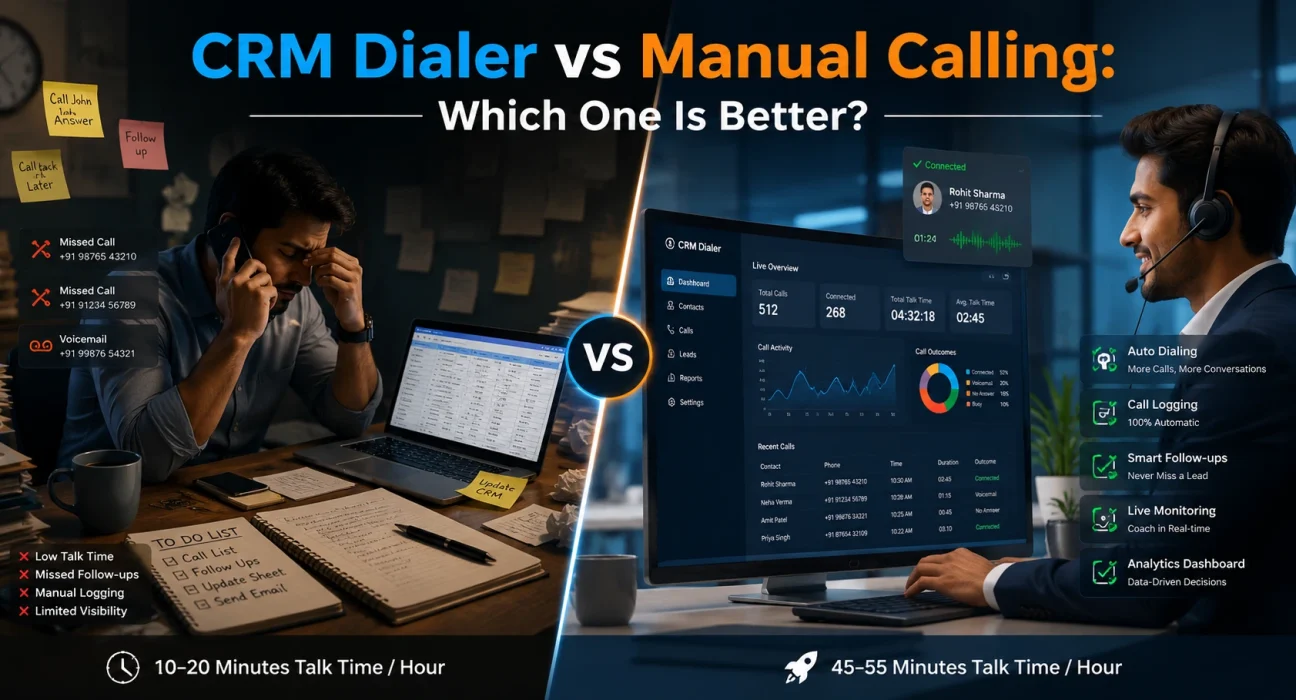
A manual caller typically spends anywhere between 10 to 20 minutes per hour actually talking to someone. The rest of the time goes into dialling, waiting for the ring, getting voicemails, updating notes and finding the next number.
A CRM dialer can push that number up to 45 to 55 minutes per hour of actual talk time. That is nearly 3x more conversations in the same working day.
For a sales team of 10 people, that difference is enormous over a month.
Where Manual Calling Still Makes Sense
Manual calling is not completely dead. There are specific situations where it works better.
High-value accounts – when you are calling a senior decision-maker at a large company, a little preparation matters. You want to read their profile, check their LinkedIn, and think before you dial. A dialer rushing you to the next call is not always helpful here.
Very small teams – if you have two or three salespeople making 20 to 30 calls a day, setting up and managing a dialer may not be worth the effort and cost.
Relationship-based selling – some industries, like consulting or wealth management, depend heavily on personal touch. Agents know their clients by name and prefer to dial them directly.
Non-standard calling scenarios – if your calls involve sensitive matters or complicated setups, automated dialling may not suit the flow.
Where a CRM Dialer Wins Clearly
For most sales teams running moderate to high volumes, a CRM dialer is hard to beat.
More calls, more conversions – the math is simple. More conversations in a day means more chances to close. CRM dialers remove the dead time between calls and keep agents focused.
Automatic call logging – every call gets recorded and saved automatically. No more relying on agents to update CRM notes after every conversation. This also means managers get cleaner data.
Better follow-up – when a lead does not pick up, the dialer can schedule an automatic callback at the right time. Nothing slips through the cracks.
Real-time coaching – many CRM dialers let managers listen in on live calls and even whisper tips to the agent without the customer hearing. This is very useful during onboarding new reps.
Compliance support – tools like Do Not Call (DNC) list filters and call recording consent prompts help teams stay on the right side of regulations, especially important for outbound calling in India and other regulated markets.
Performance visibility – dashboards show you who is calling, for how long, what the outcomes are, and where deals are getting stuck. With manual calling, you are flying blind.
Cost: CRM Dialer vs Manual Calling
People often assume manual calling is cheaper because there is no software to pay for. But when you account for the cost of lost productivity, missed follow-ups, data errors, and the time managers spend chasing call reports — the real cost of manual calling is much higher.
A CRM dialer has a monthly subscription cost, yes. But most teams see a positive return within the first few months simply from the increase in daily call output.
Also worth noting: many modern CRM platforms include a dialer as part of their base plan. So if you are already paying for a CRM, you may already have access to dialling features without any extra cost.
Training and Setup: Is It Hard to Switch?
This is a common concern, especially for teams that have been doing manual calling for years.
The honest answer is that most CRM dialers today are built for non-technical users. Agents get a simple click-to-call interface. The learning curve is typically a few days at most.
The bigger shift is behavioural. Agents used to controlling their own pace sometimes feel that a dialer is too aggressive or does not give them enough time to prepare between calls. This is a valid concern, and it is worth choosing a dialer that lets you set a wrap-up time between calls a buffer period where the agent can add notes or take a breath before the next number is dialled.
Which One Should You Choose?
Here is a simple way to think about it.
If your team makes more than 50 calls per agent per day and you are focused on outbound lead generation, a CRM dialer is almost certainly the right move. The productivity gains alone justify the switch.
If your team makes fewer calls, focuses on deep relationship selling, or handles very senior accounts, manual calling with a good CRM for note-taking may be the better fit at least for that segment of your work.
Many teams also use a hybrid approach. The dialer handles cold outreach and follow-up calls at scale. For warm or high-value accounts, agents call manually with full context from the CRM in front of them. This tends to work very well in practice.
Conclusion
The debate around CRM dialer vs manual calling is not really about which one is better in theory. It is about what your team actually needs right now.
If you are trying to scale outbound calling, reduce agent downtime, and get cleaner data into your CRM, a dialer is the obvious next step. If you are a small team with a relational sales model, manual calling with good CRM discipline can still serve you well.
The key is to stop treating this as an either-or decision and start thinking about where each approach fits in your overall sales process. Most successful sales teams use both, just for different parts of the funnel.
Start with a free trial of a CRM dialer if you have not already. Run it for 30 days alongside your current setup and compare the numbers. The data will tell you everything you need to know.