

How to Automate Lead Follow-Ups With CRM Software
A lead comes in at 11 AM. Nobody calls back until 4 PM. By then the person has already spoken to two other vendors and stopped answering unknown numbers. This is not a rare accident — it is what happens by default when follow-ups depend on someone remembering to do them.
Lead follow up automation fixes this by letting software track every lead’s next action, remind the right agent at the right time, and trigger the next step automatically instead of depending on memory or a spreadsheet. Businesses that rely on manual tracking, such as a shared Excel sheet or sticky notes on a desk, typically lose leads not because the leads were bad, but because nobody followed up in time. Teams using lead management software that includes automated follow-up scheduling can reduce this gap significantly, because the system — not a person’s memory — decides when a lead needs attention.
This article explains what lead follow-up automation actually means, how it works inside a CRM, and how to set it up properly for a telecalling or sales team.
What Is Lead Follow-Up Automation?
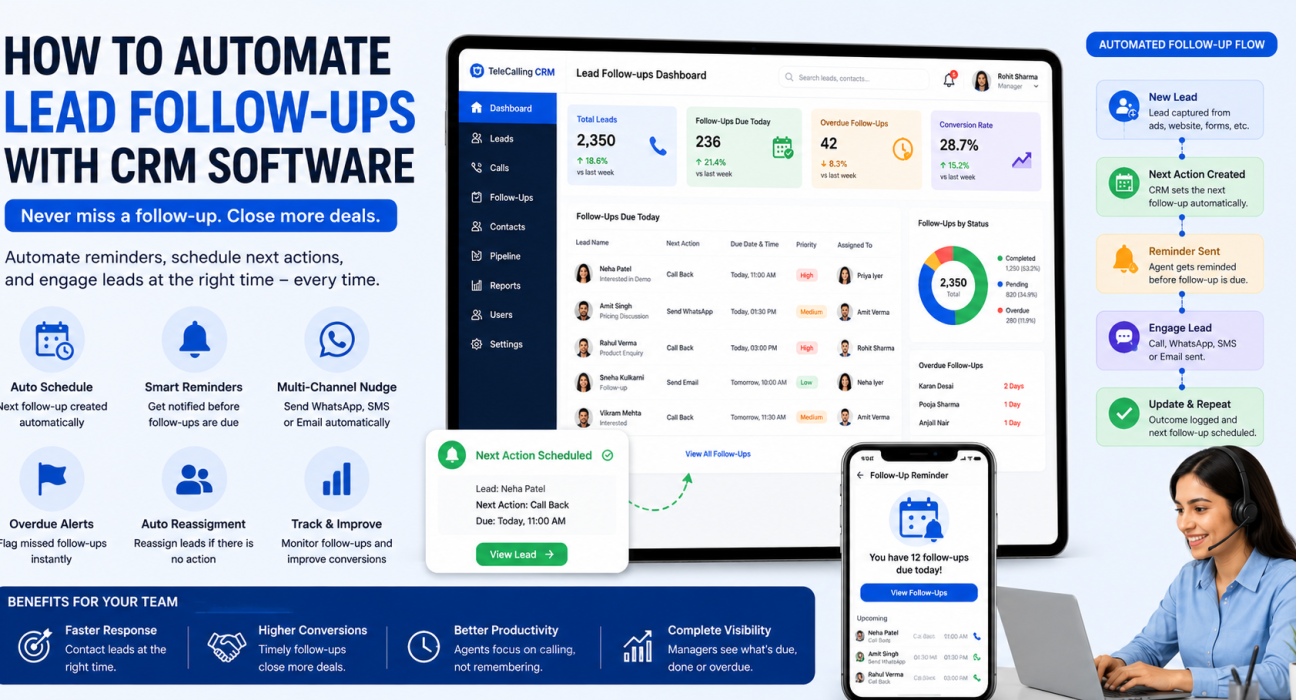
Lead follow-up automation is the use of CRM software to schedule, remind, and sometimes trigger the next action for a lead automatically, instead of relying on an agent to remember.
In practice, this includes:
- Automatically creating a follow-up task after a call ends
- Sending reminders before a scheduled callback is due
- Flagging leads where a follow-up has been missed
- Sending a WhatsApp or SMS nudge on a set schedule
- Re-assigning a lead if the original agent does not act on it
The goal is not to replace the salesperson. It is to make sure no lead depends entirely on one person’s memory on a busy day.
Why Manual Follow-Ups Fail
Most sales teams do not lose leads because of bad selling. They lose leads because of poor follow-up timing.
Common reasons manual follow-up breaks down:
- Volume outgrows memory. An agent handling 15–20 leads a day cannot reliably remember which lead needs a call today versus next Tuesday.
- No visibility for managers. Without a shared system, a sales manager cannot see which leads are overdue until the customer has already gone cold.
- Leads sit in silos. A lead captured from Facebook Ads, another from a Google Sheet, and another from a walk-in enquiry all need to be tracked in one place — not three.
- Follow-up timing is guesswork. Calling too early feels pushy. Calling too late means the lead has already decided. Automation removes the guesswork by using consistent, rule-based timing.
- Handoffs lose information. When one agent leaves or an account is transferred, notes and history often get lost with them.
Each of these is a process gap, not a people gap. Automation closes the gap by making follow-up a system responsibility rather than an individual one.
How Automated Follow-Ups Work Inside a CRM
Here is a direct answer: a CRM automates follow-ups by attaching a “next action” and a due date to every lead, then using reminders, alerts, and rule-based triggers to make sure that action happens on time — without a person having to remember it manually.
1. Every Lead Gets a Next Action
The moment a call ends, the agent logs the outcome — interested, call back later, not reachable, and so on. A good CRM converts that outcome into a scheduled follow-up automatically, rather than leaving it to the agent to create a separate reminder.
2. Reminders Fire Before the Due Time
Instead of a follow-up quietly sitting on a list, the system nudges the agent ahead of time. This is especially useful for high-volume telecalling teams where dozens of callbacks are due on the same day.
3. Overdue Leads Are Flagged
If a follow-up is missed, it should not disappear into the pipeline. It should surface as overdue, both to the agent and to the manager, so it gets picked up the same day rather than a week later.
4. Priority Decides the Order
Not every lead deserves the same urgency. A lead that has shown strong interest (“hot”) should get a shorter follow-up window than one that is still exploring options (“cold”). Rule-based prioritisation means hot leads get chased sooner without a manager having to manually reorder anyone’s task list.
5. Automation Rules Trigger the Next Step
Beyond reminders, workflow automation can do more of the work on its own:
- Auto-assign a new lead to the next available agent
- Send a WhatsApp follow-up template if a call goes unanswered
- Alert a manager if a lead has had no activity for three days
- Move a lead to a different pipeline stage based on call outcome
This is where telecalling software becomes genuinely different from a plain spreadsheet — the system reacts to events (a lead created, a call missed, a stage changed) instead of waiting for someone to check in.
Manual Tracking vs Automated Follow-Up
| Aspect | Manual Tracking (Spreadsheet/Notes) | Automated CRM Follow-Up |
|---|---|---|
| Reminders | Depends on the agent remembering | System-generated, time-based |
| Visibility for managers | Limited, needs manual checking | Real-time overdue and pending views |
| Lead prioritisation | Based on gut feel | Based on lead score/priority rules |
| Handling missed follow-ups | Often unnoticed | Flagged as overdue automatically |
| Multi-channel nudges (SMS/WhatsApp) | Manual, one lead at a time | Scheduled or triggered automatically |
| Scaling to more leads | Gets harder with volume | Same process regardless of volume |
Real-World Examples Across Industries
Real estate: A site-visit enquiry comes in through 99acres or MagicBricks. If the buyer does not answer the first call, the CRM can automatically schedule a second attempt for the next day and send a WhatsApp message with property details in the meantime, keeping the enquiry warm until the agent connects.
Education: A prospective student fills out an admission enquiry form. Automated follow-up ensures the counsellor calls within the same day, and if the student says “will decide after discussing with parents,” a follow-up is scheduled for a realistic window — say, three days later — rather than being forgotten.
Insurance: A policy renewal that is due in 15 days can trigger an automatic reminder to the agent well in advance, rather than the renewal being missed and the customer lapsing to a competitor.
Recruitment: A candidate who does not pick up the first screening call can be automatically queued for a second attempt at a different time of day, improving connect rates without extra manual tracking.
B2B sales: A demo request that goes unanswered for 24 hours can trigger an internal alert to the sales manager, so no enquiry sits untouched over a weekend.
These are illustrative examples of how the same underlying mechanism — scheduled follow-up plus reminders plus rule-based triggers — applies differently depending on the sales cycle.
Benefits of Automating Lead Follow-Ups
- Fewer leads slip through the cracks. Every lead has a scheduled next action, not an implicit assumption that “someone will call.”
- Faster response times. Automated assignment and reminders shorten the gap between lead creation and first contact.
- Better manager visibility. Overdue and pending follow-ups are visible in one dashboard instead of scattered across individual notebooks.
- Consistent customer experience. Leads get contacted on a predictable schedule regardless of which agent is handling them.
- More time for selling, less for admin. Agents spend less time deciding “who do I need to call today” and more time actually calling.
Common Mistakes to Avoid
- Automating without setting realistic follow-up windows. If every lead gets a reminder in 5 minutes, agents will start ignoring alerts altogether.
- Treating all leads the same. A hot lead and a cold lead should not follow the same follow-up cadence.
- Not reviewing overdue follow-ups regularly. Automation surfaces the overdue list — but someone still has to act on it.
- Overloading customers with messages. Automated WhatsApp or SMS nudges should support a call, not replace human contact entirely.
- Ignoring DNC (Do Not Call) compliance. Any automated calling or messaging system should respect Do Not Call lists and calling-hour restrictions.
What to Look for in Follow-Up Automation Software
Businesses evaluating CRM for telecallers should check for a few practical capabilities before choosing a tool:
- Automatic follow-up creation based on call outcome, not manual entry
- Reminders that reach the agent before the follow-up is due, not after
- A clear overdue list visible to both agents and managers
- Priority-based scheduling so hot leads are not treated the same as cold ones
- Multi-channel options (call, SMS, WhatsApp) on a single lead timeline
- Reporting on follow-up completion rates, so managers know if the process is actually working
How TeleCallingCRM Helps With Follow-Up Automation
TeleCallingCRM includes follow-up scheduling and smart reminders as a built-in part of its lead management workflow. When an agent logs a call outcome, a follow-up can be scheduled with quick presets or a custom date, and the system sends reminders before it is due, flags overdue callbacks, and can automatically create the next follow-up based on how the previous call went. Priority-aware timing means hot leads get shorter follow-up windows than cold ones, and managers can see Today, Overdue, and Upcoming follow-ups in one view rather than chasing agents individually.
Beyond reminders, its automation and workflow builder can trigger actions such as auto-assigning a new lead, sending a WhatsApp template if a call goes unanswered, or alerting a manager when a lead has gone quiet — all without manual intervention. This sits alongside lead capture from 12+ sources, call tracking, and a mobile app, so the same follow-up logic applies whether an agent is on a desktop or calling from the field.
This is not a claim that automation guarantees more sales. What it does is remove the dependency on individual memory, which is where most follow-up failures actually start.
Frequently Asked Questions
What does “lead follow-up automation” mean in simple terms?
It means a CRM automatically schedules, reminds, and tracks the next action for each lead — such as a callback or message — instead of relying on an agent to remember it manually.
Is follow-up automation only useful for large sales teams?
No. Even a team of 2–5 agents benefits, since missed follow-ups happen due to volume and timing, not just team size. Small teams often lose leads precisely because there is no formal tracking system.
Does automation replace the need for a salesperson to call?
No. Automation handles scheduling, reminders, and triggers. The actual conversation still needs a human agent — automation just makes sure that conversation happens on time.
Can follow-up automation work with WhatsApp and SMS, not just calls?
Yes, most modern telecalling CRMs support scheduled or triggered WhatsApp and SMS messages alongside calls, so a lead can be nudged even before or after a call attempt.
How soon after a lead comes in should the first follow-up happen?
This depends on the industry, but faster is generally better. Many businesses aim for the first response within minutes to a few hours, since interest tends to fade quickly if a lead is not contacted promptly.
What happens if an agent misses a scheduled follow-up?
In a well-set-up CRM, the follow-up is flagged as overdue and surfaced to both the agent and the manager, so it can be picked up quickly rather than being forgotten.
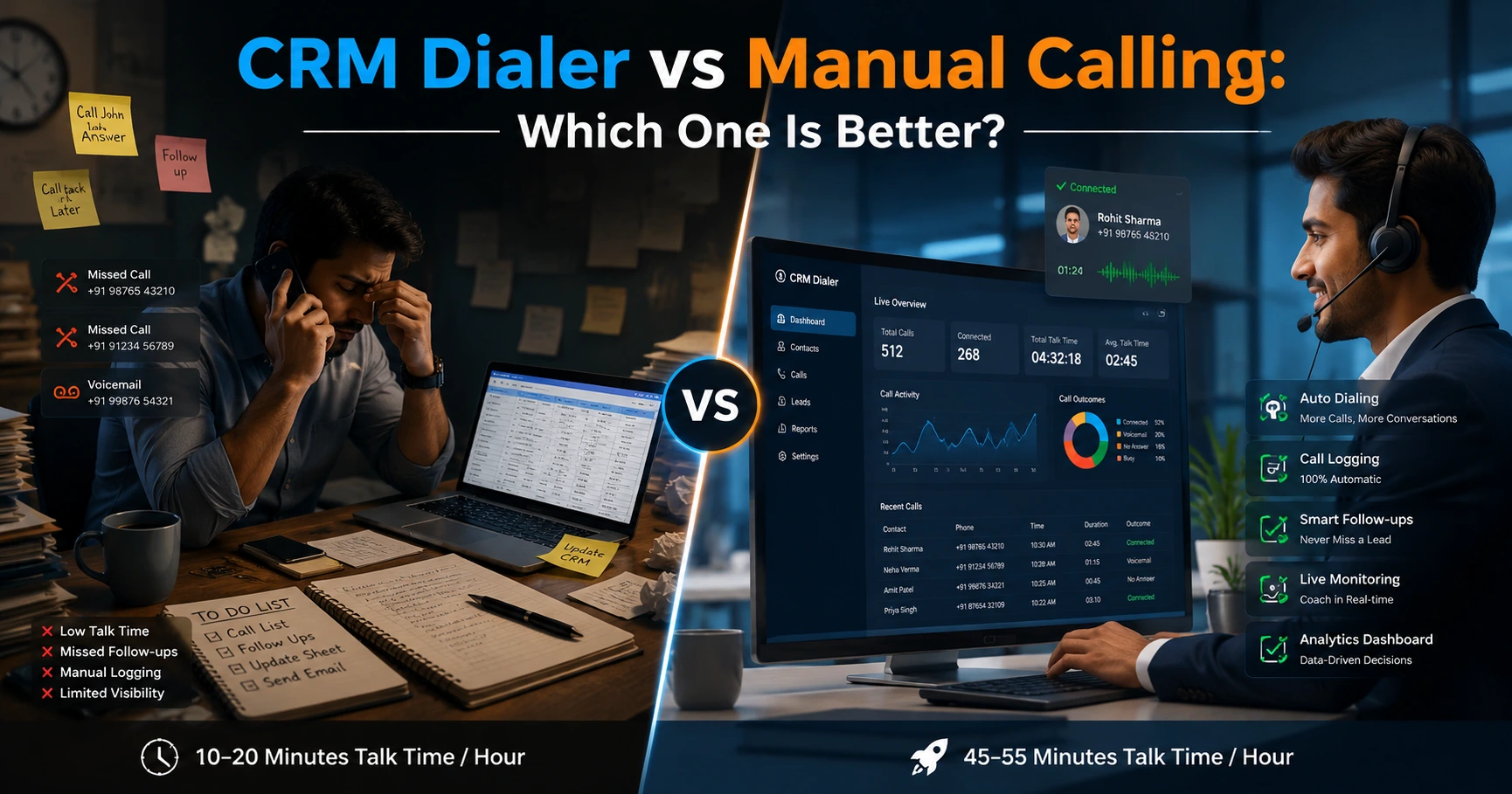
Is lead follow-up automation the same as an auto dialer?
No. An auto dialer helps agents dial through a list of numbers faster. Follow-up automation is about scheduling and reminding — deciding which lead needs attention and when — and the two often work together in the same CRM.
Conclusion
Lead follow-ups fail most often because they depend on individual memory rather than a system. Automating this process — through scheduled reminders, overdue alerts, and rule-based triggers — closes that gap without adding extra manual work for the sales team.
Businesses that want to see how this works in practice can look at how lead follow-up software is built into a telecalling CRM’s day-to-day workflow, from the moment a call ends to the moment the next action is due.