How to Automate Lead Assignment for Sales Teams
A new lead comes in at 10:05 AM. The manager is in a meeting, so nobody assigns it. By the time someone picks it up, the customer has already spoken to two competitors. Delays like this are common when leads are shared through WhatsApp groups, spreadsheets or a manager’s memory. With automated lead assignment, the system gives each new lead to the right person straight away, based on rules you set.
This guide explains what automated lead assignment is, the main ways to do it, how to set it up step by step and which mistakes to avoid.
What Is Automated Lead Assignment?
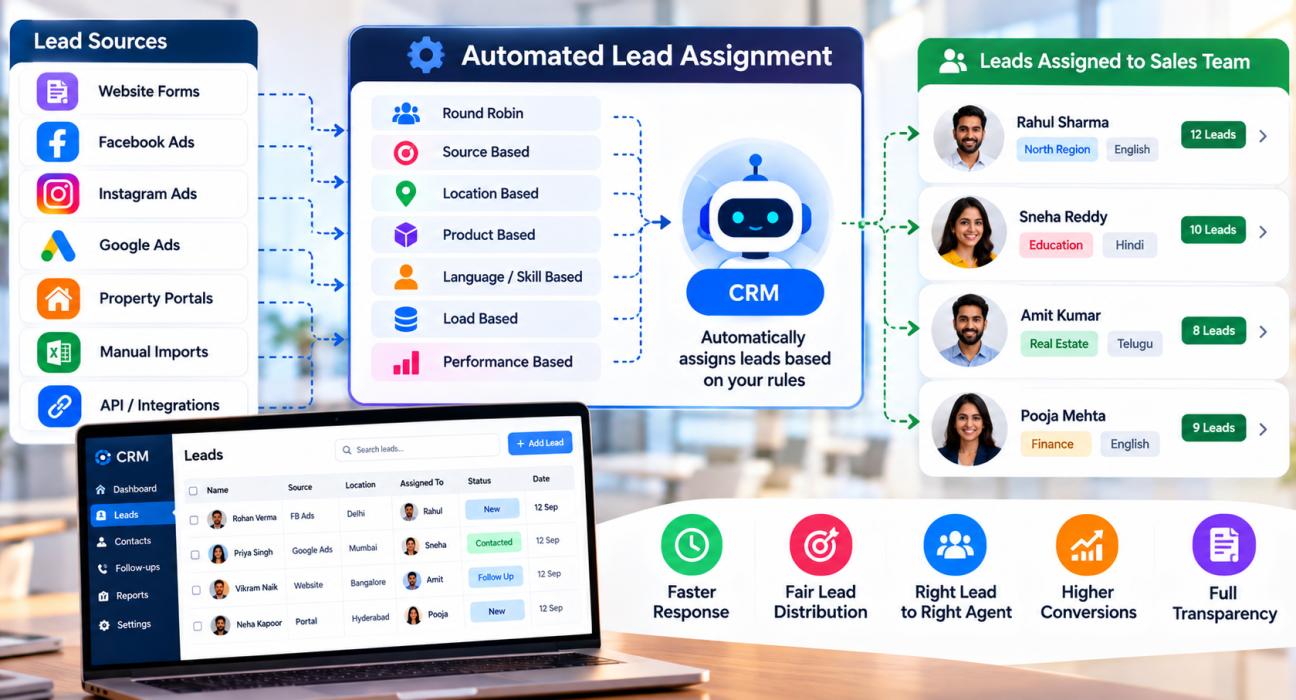
Automated lead assignment is the process of using software rules to give new leads to sales agents automatically. Rules can be based on rotation, lead source, location, product, agent skills or workload. It replaces manual distribution, so leads are assigned quickly, fairly and without depending on one manager.
It is usually a feature of a CRM or lead management software. Leads enter from forms, ads, portals or imports. The system checks the rules and assigns an owner. The agent is then notified and can start calling.
Why Manual Assignment Causes Problems
Manual assignment works when there are five leads a day and two agents. It breaks as volume grows. Typical problems include:
- Slow response. Leads wait for a manager to distribute them.
- Unfair distribution. Some agents get better leads or more leads than others.
- Wrong fit. A lead who needs Hindi support goes to an agent who speaks only English.
- No accountability. When ownership is unclear, nobody follows up.
- Duplicate work. Two agents call the same lead.
- Lost leads during leave or turnover. Leads assigned to an absent agent sit untouched.
- No record. Managers cannot see who received what and when.
Common Methods of Automated Lead Assignment
| Method | How it works | Best for |
|---|---|---|
| Round robin | Leads go to agents in turn | Teams where agents have similar skills and leads are similar |
| Weighted round robin | Some agents get more leads based on capacity or experience | Teams with senior and junior agents |
| Source-based | Leads from a specific source go to a specific agent or team | Multiple channels such as Facebook ads, Google Ads and portals |
| Location-based | Leads go to agents covering that city or region | Field sales, real estate, regional teams |
| Product-based | Leads go to agents who handle that product or course | Teams selling several products |
| Skill or language-based | Leads go to agents with the right language or expertise | Multilingual teams |
| Load-based | Leads go to the agent with the fewest open leads | Teams that want balanced workloads |
| Performance-based | Better-converting agents receive more or higher-value leads | Teams with clear performance data |
Many teams combine methods. For example, they first split leads by product, then use round robin within each product team.
How to Set Up Automated Lead Assignment
Step 1: List your lead sources
Write down every place leads come from, such as website forms, Facebook and Instagram lead ads, Google Ads, property portals, Google Sheets and manual imports. Check that your CRM can capture each source automatically or through CSV import.
Step 2: Decide what matters for assignment
Ask what should decide who gets a lead. Common factors are:
- Product or service
- City or region
- Language
- Lead value or score
- Agent availability
- Agent experience
Step 3: Choose a primary method
Start simple. For most small teams, round robin or source-based routing is enough. Add more rules only when you see a clear need.
Step 4: Define fallback rules
Decide what happens if a lead does not match any rule, or if the assigned agent is absent. A common fallback is to assign the lead to a team leader or a general pool.
Step 5: Set working hours and availability
Leads should not be assigned to agents who are on leave or off shift. Check whether your tool supports availability settings, or whether you must update them manually.
Step 6: Set response targets and alerts
Assignment is only the first step. Set a target for first contact, and use alerts when a lead is not called in time. Some tools can reassign the lead automatically if the agent does not act.
Step 7: Test with a small batch
Run the rules on a sample of leads or with one team before applying them to everything. Check that leads go to the right people.
Step 8: Review weekly
Look at lead distribution, response time and conversion by agent and source. Adjust the rules if some agents are overloaded or some sources are ignored.
Examples of Assignment Rules (Hypothetical)
These examples are illustrations only.
- Real estate: Leads from a property portal for a specific city go to the agent handling that city. Leads for other cities go to a separate team. See how this fits a real estate CRM workflow.
- Education: Enquiries for a specific course go to the counsellor handling that course. Hindi-speaking enquiries go to a Hindi-speaking counsellor.
- Loan and finance: Leads from a partner form go to a senior agent, while leads from ad campaigns rotate among the whole team.
- Insurance: New policy leads rotate among sales agents, while renewal leads go to the renewals team.
- Recruitment: Candidate enquiries for technical roles go to the technical recruiter, and others go to a general pool.
Benefits of Automated Lead Assignment
- Faster first response. Leads are assigned in seconds, not hours.
- Fair distribution. Rules treat every agent consistently.
- Better fit. Leads reach agents who know the product, language or region.
- Clear ownership. Each lead has a named owner.
- Less manager workload. Managers focus on coaching, not forwarding leads.
- Better tracking. You can see who received what and how they performed.
- Fewer duplicates. Each lead is assigned once.
Limitations to Keep in Mind
- Automation follows rules, not judgement. A rule cannot know that a particular agent has a great relationship with a customer.
- Bad rules create bad results. If the logic is wrong, leads will consistently go to the wrong people.
- Fast assignment does not guarantee fast follow-up. Agents still need to call quickly.
- Round robin can be unfair in practice. If lead quality varies by source, agents may get different quality even with equal numbers.
- Data quality matters. If location or product fields are missing or wrong, rules based on them will not work.
- Some rules need setup and testing. Check what your tool supports before you promise a complex setup.
Common Mistakes to Avoid
- Overcomplicating rules at the start. Begin with one or two rules and improve over time.
- Ignoring absent agents. Leads sent to someone on leave will wait.
- No fallback rule. Unmatched leads may sit unassigned.
- Not telling agents how it works. Agents should understand why they got a lead and what they must do.
- Not monitoring response time. Assignment without follow-up tracking hides slow response.
- Never reviewing rules. Products, teams and lead sources change, and rules must change too.
- Sending all good leads to the same agents. This can demotivate others and overload top performers.
- Ignoring consent and DND rules. Automation should not push the team to call numbers they should not call. Check current Indian regulations for calls and messages.
What to Look for in Lead Assignment Software
Ask these questions when comparing tools:
- Can it capture leads from all our sources automatically?
- Which assignment rules does it support?
- Can we set fallback rules and handle absent agents?
- Are agents and managers notified when a lead is assigned?
- Can leads be reassigned manually or automatically?
- Can managers see distribution and response time by agent?
- Does it also handle follow-ups, call logging and reports?
- Can we test it before paying?
How TeleCallingCRM Can Help
TeleCallingCRM is a CRM built for telecalling and outbound sales teams in India. Based on the information on its website, capabilities relevant to lead assignment include:
- Lead import and integrations: CSV import with de-duplication and DNC checks, plus integrations with Facebook and Instagram Lead Ads, Google Ads, WordPress, Wix, Google Sheets, Zapier and several Indian lead portals.
- Automations and workflows: Rules to auto-assign leads, schedule follow-ups, send WhatsApp nudges and alert managers when a lead’s stage changes.
- Lead scoring: Helps agents focus on likely prospects first.
- Follow-ups and call tracking: Scheduling, reminders and overdue alerts, with every call logged with duration, outcome, recording and notes.
- Reports and live monitoring: Analytics by agent and a real-time view of team activity.
- Roles and permissions: Role-based access for agents, team leaders and admins.
The website does not detail each assignment rule type, such as round robin, weighted or skill-based routing. If you need a specific method, ask for a demo and confirm that the rule is supported before you decide. Features and plans can change, so verify current details.
Frequently Asked Questions
What is automated lead assignment?
Automated lead assignment uses software rules to give new leads to sales agents without manual work. Rules can depend on rotation, source, location, product, language or workload. It helps teams respond faster, distribute leads fairly and keep clear ownership of each lead.
What is round robin lead assignment?
Round robin assigns each new lead to the next agent in a list, in turn, like dealing cards. It is simple and fair in numbers, but it does not consider skill, location or lead quality, so many teams combine it with other rules.
How do you assign leads fairly to a sales team?
Use clear rules, such as rotation within a team, and share lead sources evenly. Monitor the number and quality of leads each agent receives. If some sources convert better, rotate agents across sources or use weighted rules, and review the distribution regularly.
How fast should a new lead be assigned?
As fast as possible, ideally immediately after the lead arrives. There is no universal number, but assignment should not be the reason for a delay. Set a target for first contact as well, and track it in your CRM reports.
Can I assign leads based on location or language?
Yes, if your CRM supports it and the lead has the right data. For example, leads from a city can go to the agent covering it. Check that location or language fields are captured correctly, or the rules will not work as expected.
What happens if an agent is on leave?
Set fallback rules. Leads can go to a team leader, a backup agent or a general pool. Some tools allow availability settings or automatic reassignment. If yours does not, managers should reassign pending leads manually.
Do small teams need automated lead assignment?
Small teams with few leads can assign manually. But once leads come from several sources or arrive outside working hours, automation saves time and reduces missed leads. Start with one simple rule and expand only when needed.
What is the difference between lead distribution and lead routing?
The terms overlap. Lead distribution usually means sharing leads among agents fairly, while lead routing means sending each lead to the right person based on rules such as product or region. Most CRMs use both ideas together.
Conclusion
Automated lead assignment removes a common bottleneck: waiting for someone to hand out leads. When rules are simple, tested and reviewed, leads reach the right agent quickly, ownership is clear and managers can spend more time coaching.
Start with your lead sources and one or two rules, add fallbacks for absent agents, and track response time. If your team works mainly by phone, you can try a lead management software such as TeleCallingCRM alongside other options, test the assignment rules you need and choose what fits your process.