Field Service Job Management: From Assignment to Completion
Most field service problems don’t start at the customer’s door. They start earlier, when a job is assigned over a phone call, a WhatsApp message or a spreadsheet row, and nobody can say who has it or whether it was finished.
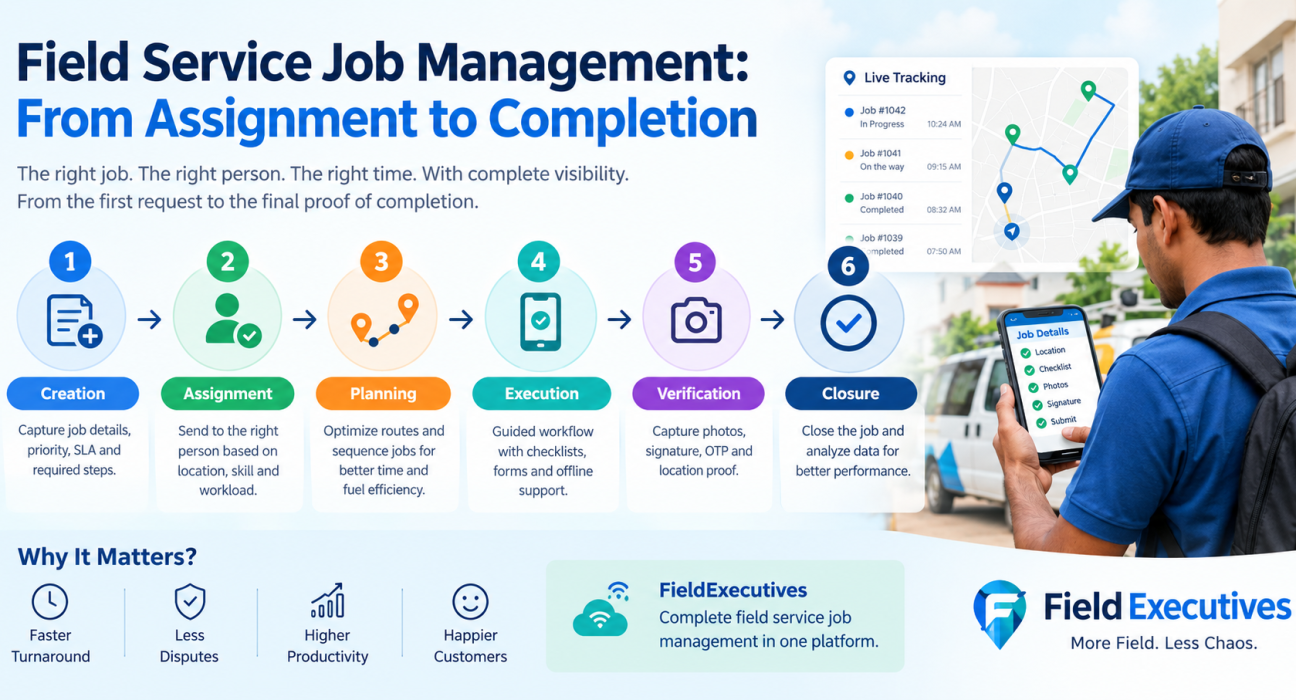
Field service job management software fixes this by putting every job on one tracked path: created, assigned, accepted, executed, verified and closed. This guide walks through that path stage by stage. It also covers where jobs usually go wrong, what to look for in software, and how FieldExecutives supports each step.
What Is Field Service Job Management?
Field service job management is the process of creating, assigning, tracking and closing jobs performed by employees outside the office, such as installations, repairs, inspections, deliveries and collections. It covers the whole job lifecycle, from the first request to the final proof of completion.
Good job management answers four questions at any moment:
- What needs to be done, and by when?
- Who is responsible?
- Where is the job in its lifecycle?
- What proof shows it was done properly?
When these answers live in different tools, managers spend their day chasing updates instead of managing work.
What Is Field Service Job Management Software?
Field service job management software is a platform that digitizes the job lifecycle. Managers create and assign jobs, field staff execute them from a mobile app, and everyone sees status updates in real time.
A complete system usually includes:
- Job creation with checklists, priorities and deadlines
- Assignment and dispatch to the right person
- A mobile app for field staff, ideally one that works offline
- Proof capture (photos, signatures, OTP)
- SLA timers and escalations
- Live tracking and reporting
The Job Lifecycle: Assignment to Completion
| Stage | What happens | What can go wrong without software |
|---|---|---|
| 1. Creation | Job details, priority and SLA are defined | Incomplete or unclear instructions |
| 2. Assignment | The right person is chosen and notified | Wrong person, delays, no acknowledgement |
| 3. Planning | The day’s jobs are sequenced into a route | Wasted travel, missed time windows |
| 4. Execution | The employee reaches the site and does the work | No proof of presence, skipped steps |
| 5. Verification | Proof and customer confirmation are collected | Disputes, rework, “he never came” |
| 6. Closure and review | The job is closed and data is analyzed | No visibility into delays or quality |
Stage 1: Create the job with complete information
A job that starts with vague information usually ends with a repeat visit. Capture the customer, location, job type, priority, deadline and the steps the technician must follow.
Best practices:
- Use standard job types so every installation or repair follows the same checklist.
- Attach an SLA to each job so the clock is visible from the start.
- Capture the details your business actually needs with custom forms instead of free-text notes.
Stage 2: Assign the job to the right person
The right assignment balances location, workload and skill. Sending a job to the person who is nearest and available is faster than sending it to whoever answers the phone first.
Digital assignment also replaces the “did you get my message?” problem. The job lands on the employee’s phone with every detail attached, and the manager can see it was delivered.
Related: [Internal Link Opportunity: Relevant FieldExecutives blog article on task assignment]
Stage 3: Plan the route and the day
Assigning jobs is only half the planning. The order in which an employee visits them decides how much of the day goes to work and how much goes to driving.
Route planning sequences stops by distance and time windows so employees don’t zigzag across a city. FieldExecutives uses AI route and beat-plan optimisation, which it says can reduce travel time by 20–30% (the company describes its savings figures as illustrative, not guaranteed).
Stage 4: Execute the job with a guided workflow
This is where most businesses lose control, because nobody can see what happens on site. Execution should be guided, not left to memory.
A good job card shows:
- Where to go and whom to meet
- What to do, as a checklist
- What to collect, whether payment, signature or readings
- What must be captured before the job can close
Offline capability matters here. Basements, warehouses, rural sites and weak-signal areas are common in field work. An offline-first app lets employees finish the job and sync when the network returns.
Stage 5: Verify with proof of presence and proof of work
Proof of visit confirms the employee was at the right place; proof of work confirms what they did. You need both.
Typical proof includes:
- Geofenced check-in at the customer location
- Before-and-after photos
- Customer signature or OTP confirmation
- Filled forms and checklists
When proof is mandatory before a job can close, disputes drop and customer conversations become fact-based.
Stage 6: Close the job and learn from the data
A closed job should produce data, not just a status change. Reviewing it shows where time is lost, which job types breach SLAs, and which routes or teams need support.
Track these metrics:
- SLA compliance: the share of jobs completed within the agreed time
- First-visit completion: jobs finished without a repeat visit
- Jobs per employee per day
- Average time from assignment to completion
- Customer feedback or NPS
Common Job Management Problems (and How to Fix Them)
Jobs get assigned but not acknowledged. Use instant mobile notifications and track the accepted status, so unacknowledged jobs surface quickly.
Managers can’t see live status. Replace phone check-ins with a live map and status updates that change as employees move through each job.
Employees close jobs without doing the work. Require photo, signature or OTP proof before closure, and use geofencing to confirm location.
SLA breaches are discovered too late. Use SLA timers and escalations so a delay is flagged while it can still be fixed.
Admin work eats the day. Move expenses, attendance and collections into the same system instead of separate spreadsheets.
What to Look for in Field Service Job Management Software
When comparing tools, check these capabilities:
- Job creation and assignment: checklists, priorities and SLAs
- Mobile app usability: simple enough for staff to use on the first day
- Offline mode: work continues without a network
- Proof capture: photo, signature and OTP
- Live tracking and geofencing: visibility that is tied to duty hours
- Route optimization: fewer kilometers per job
- Customization: forms and workflows that fit your process without coding
- Reporting: real-time dashboards and KPIs
- Setup effort and pricing: transparent plans and a quick rollout
Prioritize the first three. A system your team won’t use in the field delivers no data, however many features it lists.
How FieldExecutives Supports Field Service Job Management
Businesses looking to simplify these processes can use field force management software such as FieldExecutives. It covers the lifecycle described above in one platform.
- Assign and dispatch: managers create tasks and visits with checklists, priority and SLAs, and the job reaches the employee’s phone.
- Guided execution: a job card shows where to go, whom to meet and what to collect.
- Proof capture: photo, signature and OTP before a job closes, with auto check-in by geofence.
- Live visibility: a real-time map, GPS trail and SLA timers for managers.
- Offline-first mobile app: work continues without network and syncs afterward.
- Custom forms and workflows: job types, checklists and approvals configured to your process.
- Money tracking: expense claims and collections tracked alongside field work.
FieldExecutives is used across industries, including field service and repair, which covers AMC, installations and SLA-based jobs. Location features apply only to on-duty staff who have granted permission.
[Internal Link Opportunity: FieldExecutives Field Service & Repair industry page, https://fieldexecutives.com/industries/field-service]
How to Roll Out Job Management Software Successfully
- Map your current process. List how jobs are created, assigned and closed today.
- Standardize job types and checklists before configuring the software.
- Define SLAs for each job type.
- Start with one team or city. Learn from the pilot before expanding.
- Train field staff on the basics: accept, execute, capture proof, close.
- Review the dashboard weekly and coach based on the data.
Keep the first version simple. You can add approvals and extra forms once the core flow is working.
Conclusion
A field job is only as controlled as its weakest handoff. Unclear creation, informal assignment, unplanned routes and missing proof each add delay and dispute. Field service job management software connects these stages so every job has an owner, a deadline, a status and evidence of completion.
Start by mapping your own job lifecycle, then choose a platform that handles assignment, guided execution, proof and live tracking together. FieldExecutives is built around that flow.