How to Automate Sales Workflows Using CRM Software
A new lead arrives from an ad at 10 AM. By the time someone assigns it, notes it and calls, half the day is gone and the lead may have already spoken to a competitor. Most of that delay is manual work: copying details, deciding who gets the lead, remembering to follow up. With sales workflow automation, a CRM can handle these repeatable steps by itself, so agents spend their time on conversations.
This guide explains what sales workflow automation is, which tasks to automate first, and how to set it up in seven steps. It is written for business owners, sales managers and telecalling teams in India.
What Is Sales Workflow Automation?
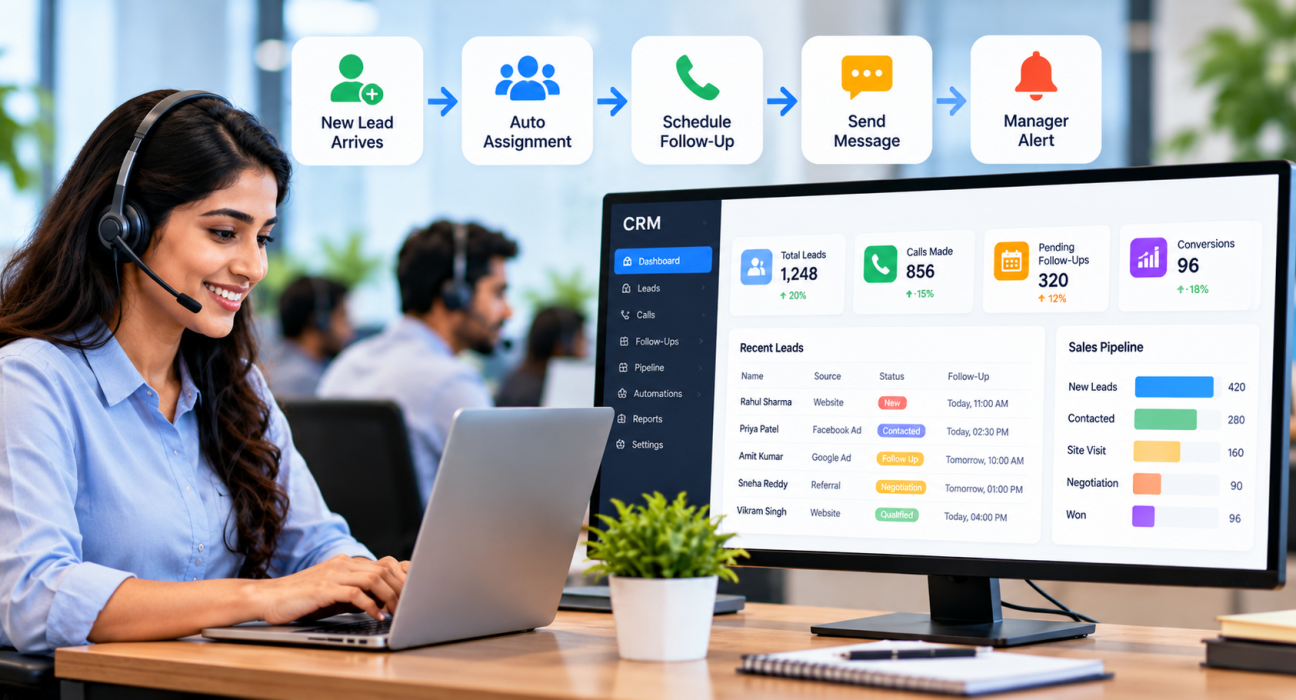
Sales workflow automation uses CRM software to run repeatable sales steps automatically when a set condition is met. For example, when a new lead arrives, the CRM can assign it to an agent, create a follow-up task and notify a manager. People still do the selling. The software handles the routine work around it.
A sales workflow is the series of actions a rep takes to move a deal forward, as Salesforce explains. Automation links several of those actions into one process that runs on triggers and rules, which Avoma describes as the difference between automating a single task and automating a whole workflow.
Every automated workflow has three parts:
- Trigger: the event that starts it, such as a new lead or a stage change.
- Condition: an optional rule, such as “only if the lead is from Pune” or “only if the lead is marked hot”.
- Action: what the CRM does, such as assign, tag, schedule a follow-up or send a message.
Why Automate Sales Workflows?
Manual processes work when a team handles ten leads a day. They break when the volume grows. Automation helps in practical ways:
- Faster first contact. Leads are assigned the moment they arrive, not when someone checks a sheet.
- Fewer missed follow-ups. Reminders and tasks are created by rules, not by memory.
- Consistent process. Every lead follows the same steps, whichever agent handles it.
- Cleaner data. Tags, stages and owners are updated automatically.
- Better management time. Managers get alerts about exceptions instead of checking every lead.
Automation does not fix a weak sales process. It speeds up whatever process you give it, so the process needs to be sound first.
Which Sales Tasks Should You Automate First?
Start with tasks that are repetitive, rule-based and easy to get wrong when done by hand. Lead capture, assignment, follow-up scheduling and manager alerts are usually the best starting points.
| Trigger | Automated action | What stays with the human |
|---|---|---|
| New lead arrives | Remove duplicates, assign to an available agent, create a first-call task | Making the call |
| Call outcome is “call back later” | Create a follow-up reminder | Confirming a suitable time with the customer |
| Lead moves to a new stage | Send a template message, notify the manager | Customising the offer |
| Follow-up is due or overdue | Remind the agent, alert the manager | Deciding whether to reassign |
The exact options depend on the CRM you use, so check what triggers and actions it supports.
How to Automate Sales Workflows Using CRM Software: 7 Steps
Step 1: Map Your Current Sales Process
Write down how a lead moves from enquiry to closure. Include who does what, how long each step takes and where leads get stuck. You cannot automate what you have not defined.
Step 2: Find the Repetitive Work
Ask your agents and managers what they repeat every day. Common answers are updating lead status, setting reminders, sharing details on WhatsApp and checking who is idle. Rank them by time lost and frequency.
Step 3: Define Triggers, Conditions and Actions
For each task, write one clear rule in plain language: “When [trigger], and if [condition], then [action].” For example: “When a new lead is created, and if the language is Hindi, assign it to the Hindi-speaking agent who is on shift.” If a rule is hard to write in one sentence, it is too complicated for now.
Step 4: Begin with Lead Capture, Assignment and Follow-Ups
Connect your lead sources, such as ads, portals, website forms and spreadsheets, so leads enter the CRM without manual entry. Then set assignment rules and follow-up rules. These three areas usually give the quickest improvement with the lowest risk.
Step 5: Add Messaging with Care
Automated WhatsApp, SMS and email messages can keep leads informed after a call. Use short, approved templates and send them only when they add value. Follow consent, Do Not Call and TRAI requirements that apply to your business, and confirm them with your legal advisor.
Step 6: Set Alerts for Exceptions
Managers should be told when something needs attention: an overdue follow-up, a lead with no owner, or a stage that has not changed for too long. This replaces constant checking with focused review.
Step 7: Test, Measure and Refine
Run each workflow with a small group first. Then track simple measures:
- Time from lead arrival to first call
- Number of overdue follow-ups
- Leads with no next action scheduled
- Stage-to-stage movement
- Agent feedback on whether the rules help
Review the rules every month. A rule that suited last quarter’s lead sources may not suit this quarter’s.
Practical Workflow Examples
These are hypothetical examples to show how rules can be designed.
Real estate: A buyer enquires through a property portal. The CRM removes duplicates and assigns the lead to an agent who is on shift. It creates a first-call task and, once the agent logs “site visit interested”, it creates a follow-up for the visit date. A real estate CRM setup can keep this sequence consistent across the team.
Loan or DSA sales: An applicant fills a web form. The lead is assigned by language, and the agent’s call outcome moves it to “Documents Pending”. A reminder prompts the next call, and the manager is alerted if the lead stays in that stage too long. See how this fits a loan DSA CRM.
Education: A parent enquires about admission. The lead is assigned to a counsellor, receives a template message with course details after the first call, and gets a callback reminder before the application deadline.
What Not to Automate
Some parts of selling should stay human:
- Negotiation and pricing discussions
- Sensitive or complaint-related conversations
- Final offers and commitments
- Any message to a lead who has asked not to be contacted
Automation works best when it removes admin work, not when it replaces judgement.
Common Mistakes to Avoid
- Automating a broken process. Fix confusing stages and unclear ownership first.
- Building too much at once. Start with three or four workflows and add more once agents trust them.
- Over-messaging leads. Too many automatic messages can annoy prospects and harm your reputation.
- Not training the team. Agents should know what the CRM does automatically and what they must still do.
- Ignoring data quality. Rules based on wrong or missing fields will produce wrong actions.
- Never reviewing the rules. Outdated rules can send leads to the wrong place.
How TeleCallingCRM Can Help
TeleCallingCRM is a CRM for outbound calling teams in India. Based on the information on its website, the following features support workflow automation:
- No-code workflow builder with triggers for lead, call and stage events, plus a follow-up-due trigger.
- Conditional rules and chained actions, such as assigning, tagging, changing stage and sending a message in one workflow.
- Messaging actions: SMS (via MSG91 with DLT), email through your own SMTP, and WhatsApp templates.
- Auto-assignment rules by round-robin, language match or fixed agent, limited to agents who are on shift.
- Smart follow-ups, which can create the next follow-up from the call outcome, with reminders and overdue alerts.
- Lead capture from 12+ sources, with de-duplication and DNC checks.
- Manager visibility through a live war room and reports. Our post on the Live War Room and reports explains this further.
The website lists flat monthly pricing from ₹999 for up to 5 users, with all features in every plan, and a 3-day free trial.
Limitations to keep in mind: TeleCallingCRM is built around calling-led sales. If your process depends on long email sequences or complex multi-department approvals, check whether it suits you. If you are comparing tools, our guide on how to choose the best telecalling CRM offers a wider checklist. Test your most important workflows during the trial before you decide.
Frequently Asked Questions
What is sales workflow automation?
Sales workflow automation uses software to carry out repeatable sales steps automatically based on triggers and rules. Examples include assigning new leads, creating follow-up tasks and sending template messages. It reduces manual work so sales teams can focus on conversations and closing deals.
What is the difference between sales automation and sales workflow automation?
Sales automation usually handles a single task, such as sending a follow-up email or updating a field. Sales workflow automation connects several tasks into one process that runs from a trigger. For example, a new lead is assigned, tagged and scheduled for a call in a single flow.
Which sales tasks should I automate first?
Start with lead capture, lead assignment, follow-up reminders and manager alerts. These tasks are repetitive, rule-based and easy to measure. Once they work well, add messaging, stage-based actions and reporting.
Can small businesses use sales workflow automation?
Yes. Small teams often benefit quickly because every missed lead matters more. Start with two or three simple rules, such as auto-assignment and follow-up reminders, and choose a CRM whose pricing and setup suit your team size.
Will automation replace my sales team?
No. Automation handles administrative and routine work, such as assigning leads and setting reminders. Conversations, trust-building, negotiation and decisions still need people. The aim is to give agents more time for real selling.
How do I know if my workflows are working?
Track time to first call, overdue follow-ups, leads without a next action, and stage movement. Compare these before and after you introduce a workflow. Also ask agents whether the rules save time or create extra steps.
Does TeleCallingCRM have workflow automation?
According to its website, TeleCallingCRM includes a no-code workflow builder with event triggers, conditional rules and actions such as auto-assign, tag, change stage and send SMS, email or WhatsApp messages. Check the features page for current details.
Conclusion
Good sales workflow automation is simple. Define your process, pick a few repetitive tasks, write clear rules, test with a small group and review often. Keep human judgement for the conversations that decide a sale.
If your team works mainly through calls, lead follow-up software with built-in workflows can be a sensible place to begin. Try it on your own lead list, and keep only the automations that genuinely help your agents.