How to Reduce Lead Leakage in Sales Teams Using CRM Software
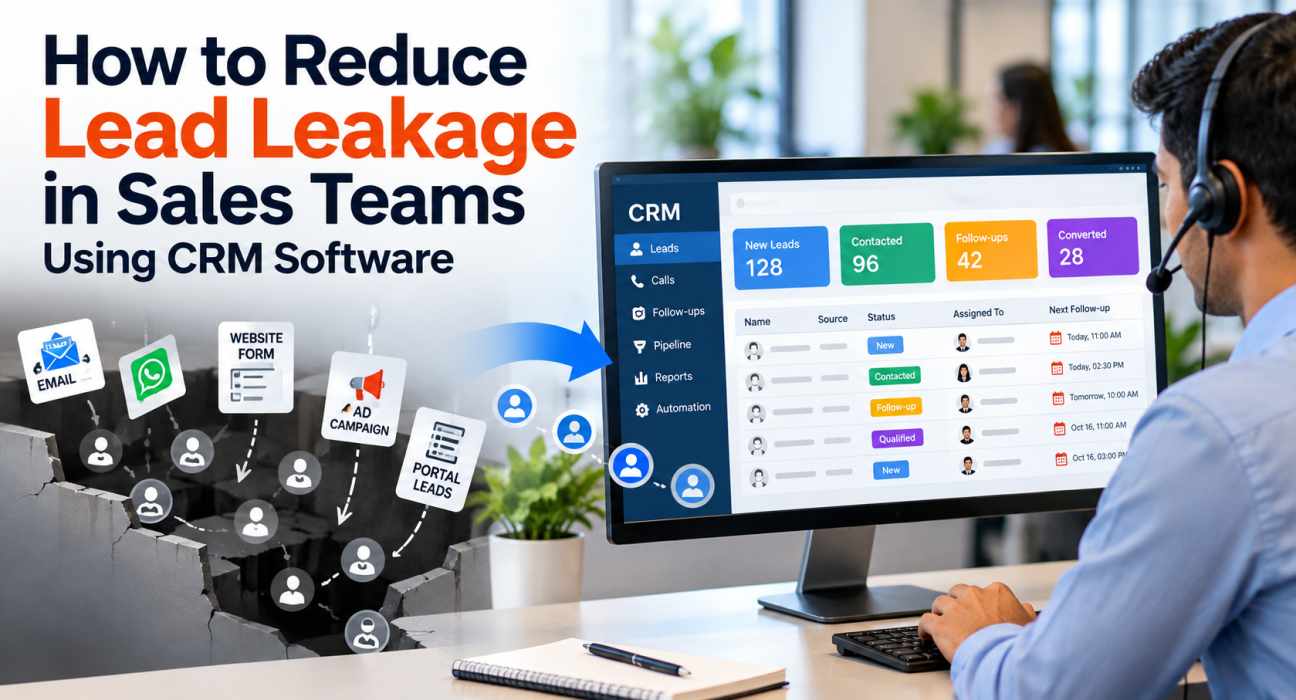
You paid for the ad, the portal listing or the campaign. The enquiry arrived. Then, somewhere between “new lead” and “first call”, it quietly disappeared. That is lead leakage, and almost every sales team has some of it, usually without measuring it. The encouraging part is that most leakage comes from a few process gaps, not from weak salespeople. Teams that want to reduce lead leakage can start by moving leads out of spreadsheets and chat groups into a CRM that assigns, tracks and reminds. This guide shows where leads leak and how to fix each gap.
What Is Lead Leakage?
Lead leakage is the loss of leads that should have become customers because they were never contacted, were contacted too late, or were dropped after the first conversation. It happens between lead capture and closure, and it is usually caused by weak routing, missed follow-ups and poor tracking rather than poor lead quality.
Not every lost lead counts as leakage. Some people were never going to buy. Leakage is the avoidable loss, the leads your team could have worked but did not.
Where Leads Actually Leak
Most teams assume the problem is lead quality. In practice, leads usually fall through one of these gaps:
| Stage | What goes wrong | What helps |
|---|---|---|
| Capture | Leads sit in emails, portals and forms | One place for all sources |
| Assignment | Lead waits for someone to pick it up | Automatic assignment rules |
| First contact | The first call happens hours or days later | Priority queues and alerts |
| Follow-up | A promised callback never happens | Reminders and overdue alerts |
| Handover | Notes disappear when an agent changes | Shared call history |
| Pipeline | Leads stay stuck at one stage | Stage tracking and reports |
| Duplicates | Two agents call the same person | De-duplication and DNC checks |
Speed deserves its own mention. A well-known 2011 Harvard Business Review study audited 2,241 US firms by sending them online enquiries. Only 37% responded within an hour, the average first response took 42 hours, and 23% never responded at all. Firms that tried within an hour were nearly seven times as likely to reach a decision maker as those that waited just one more hour.
That study is American and over a decade old, so treat it as a direction, not a benchmark for your market. The lesson still holds: fresh leads cool quickly.
Why Spreadsheets and WhatsApp Groups Make It Worse
A shared Excel sheet feels organised until three people edit it at once. Someone overwrites a status. Someone forgets to update the call result. A lead gets forwarded in a WhatsApp group, and nobody is sure who took it.
The deeper issue is accountability. When there is no timestamp for when a lead arrived and when it was first called, nobody can say where the delay happened. A manager ends up asking people instead of checking data, and good agents get blamed for system problems.
How CRM Software Reduces Lead Leakage
A CRM does not fix a broken process by itself. What it does is make each gap visible and, where possible, automatic. Here is how that plays out.
1. Capture Every Lead in One Place
Connect your lead sources so enquiries land in the CRM without copy-pasting. Ad platforms, property portals, website forms and imported lists should all feed one pipeline. If a lead never enters the system, nothing downstream can save it.
2. Assign Leads Automatically
Manual assignment depends on a manager being free. Use rules instead: round-robin for fairness, language matching for regional teams, or a fixed owner for key accounts. Good lead management software should also skip agents who are off shift, so a lead does not wait for someone on leave.
3. Make Follow-Ups Hard to Forget
Most deals need several calls. Every call should end with a next step and a date. Reminders before the callback and alerts when it is overdue turn good intentions into a routine. Overdue lists give managers a daily to-do list.
4. Keep the Full History on the Lead
When the next agent opens the record, they should see previous calls, notes, source and stage. This protects you when an agent is absent or leaves, and it stops customers from repeating themselves. It also makes the second call far more natural.
5. Watch the Pipeline, Not Just the Calls
Call counts tell you about activity, not leakage. Look at where leads stall: how many are uncontacted, how many have no next action, and which stage loses the most. Source-wise reports help too, because some channels leak more than others.
6. Automate the Boring Parts
Routine steps are where human attention slips. Workflows can assign a new lead, create a follow-up, send a WhatsApp or SMS template, or alert a manager when a lead sits untouched. Keep the rules simple at first, and add more once the basics work.
A Simple 30-Day Plan to Plug the Leaks
You do not need a big project. Try this order:
- Week 1: measure. Count last month’s leads. Note how many were contacted, how many within a day, and how many have a next action today.
- Week 2: set rules. Define who gets which lead, how fast the first call should happen, and what each call outcome means.
- Week 3: switch on reminders. Require a next follow-up date after every call, and review overdue items every morning.
- Week 4: review the numbers. Compare with week 1 and find the stage that still leaks.
If you are still choosing a tool, this guide on how to choose the best telecalling CRM for your business can help you shortlist.
Three Hypothetical Examples
These are made-up scenarios to show the idea, not real customer stories.
Real estate. A portal enquiry arrives at 9 PM on Saturday. With manual handling, it waits until Monday. With automatic assignment and a morning alert, someone calls early Sunday, before the buyer enquires elsewhere. See the real estate CRM page for related workflows.
Education. During admission season, a coaching centre gets hundreds of enquiries a week. Counsellors forget callbacks because their lists keep growing. Daily overdue follow-up lists keep the older enquiries from being buried. The education CRM page covers this use case.
Insurance. A renewal call goes unanswered. If nobody logs the attempt, the policy may lapse unnoticed. A recorded attempt and an automatic next follow-up keep the renewal on track. See the insurance CRM page.
Common Mistakes to Avoid
Buying a CRM and expecting it to work without rules is the biggest one. If agents can skip logging calls, they will, and your data will mislead you.
Other common mistakes include:
- Tracking calls made but not leads left untouched
- Having too many lead stages, which confuses agents
- Letting leads sit unassigned “until someone is free”
- Ignoring duplicate leads and DNC numbers
- Never reviewing reports with the team
How TeleCalling CRM Can Help
TeleCalling CRM is built for outbound telecalling teams in India. Based on its website, these features address the leakage points above:
- Lead capture: Integrations with Facebook and Instagram Lead Ads, Google Ads, 99acres, MagicBricks, JustDial and others. See the integration guides.
- Assignment: Round-robin, language-match or fixed-agent rules, with availability-aware assignment and de-duplication.
- Follow-ups: One-tap scheduling, reminders, overdue alerts and Today, Overdue and Upcoming lists.
- History and scoring: Call history, notes and source on each lead, plus Hot, Warm and Cold scoring.
- Automation: A no-code workflow builder that can assign, tag, restage and send messages.
- Visibility: A live team view, attendance, connection rate, funnel and source reports. You can read more in this post on the live war room and reports.
The site mentions a free 3-day trial and says all features are included in every plan. Confirm current details on the pricing page. The product is focused on outbound calling, so check the fit if you need inbound queue routing.
Frequently Asked Questions
What is lead leakage in sales?
Lead leakage is the avoidable loss of leads between capture and closure. It includes leads that were never contacted, contacted too late, or dropped after the first call. It is usually a process problem, caused by weak assignment, missed follow-ups and poor tracking.
What causes lead leakage?
Common causes include slow first response, unassigned leads, forgotten callbacks, scattered lead sources, duplicate calling and lost notes during handovers. Weak alignment between marketing and sales can also play a part when nobody owns the lead after it is captured.
How can CRM software reduce lead leakage?
A CRM captures leads in one place, assigns them by rules, schedules follow-ups, stores call history and shows pipeline reports. This reduces manual gaps and gives managers a clear view of leads that are untouched or overdue.
How do you measure lead leakage?
A simple working measure is leads with no contact or no next action, divided by total leads received. Track it weekly, and break it down by source, agent and stage. This is a practical formula, not an industry standard.
How quickly should a team call a new lead?
There is no universal rule, but sooner is generally better for fresh enquiries. The Harvard Business Review study mentioned above found much better results from contacting within an hour. Set a clear target for your team and monitor it.
Is lead leakage the same as revenue leakage?
Not exactly. Lead leakage happens early, when leads are lost before meaningful engagement. Revenue leakage is wider and can include lost deals, discounts and missed renewals. Fixing lead leakage is a good first step towards both.
Conclusion
Lead leakage rarely comes from one big failure. It builds from small gaps: a lead nobody picked up, a callback nobody remembered, a note nobody saw. Start by measuring where your leads stall, set simple rules for assignment and follow-ups, and use your CRM to enforce them every day. If you want to see how lead follow-up software works with your own lead sources and team, you can request a demo and compare it with your current process.