Retail Outlet Monitoring Software: Track Stock Availability
A product that is out of stock in one outlet is a lost sale. Across 200 outlets in five cities, it becomes a pattern you may not notice until the monthly report arrives. The report is usually late, and it rarely shows which shelves went empty or why.
Retail outlet monitoring software closes that gap. It gives you a verified, near real-time view of what is on the shelf in every outlet your team covers. This guide explains how to monitor product availability across retail outlets, what to measure, and what to look for in software.
What Is Retail Outlet Monitoring Software?
Retail outlet monitoring software is a system that records and verifies what is happening inside retail stores, including stock availability, shelf placement, and store visits, so brands and distributors can see gaps across all outlets from one dashboard.
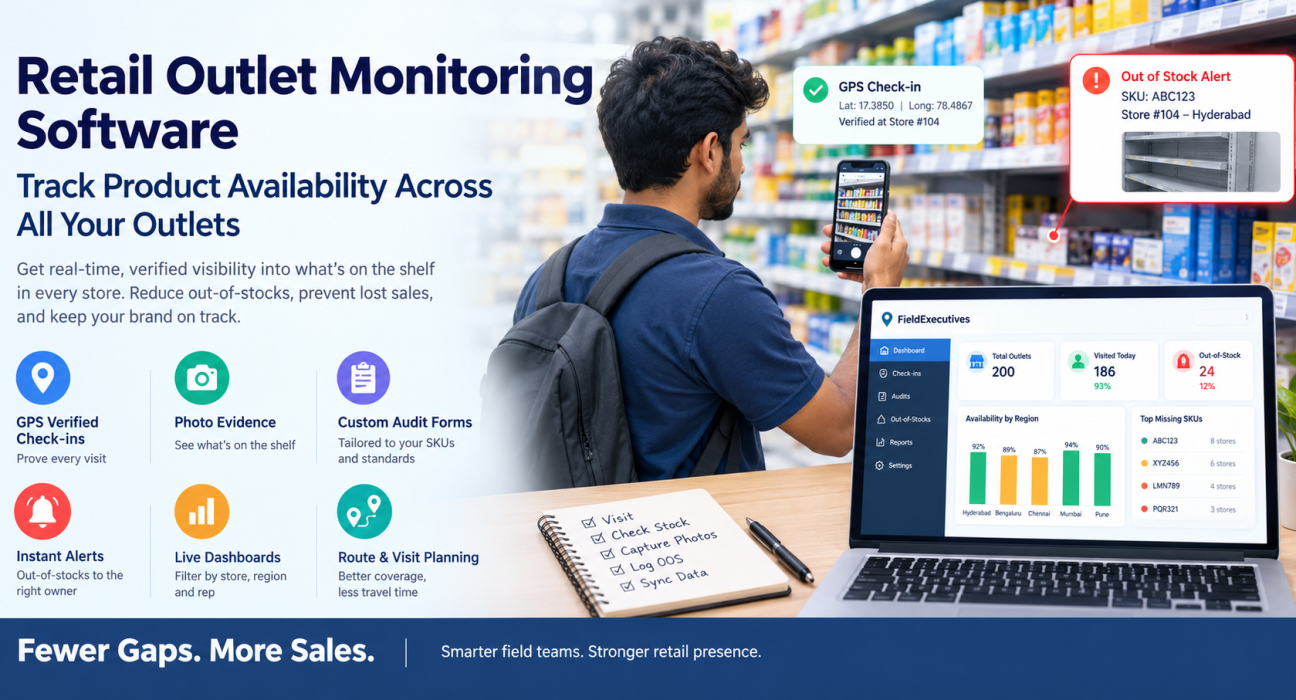
In practice, field staff such as merchandisers, sales reps, and promoters visit each outlet. They check in with GPS, complete an audit form, and capture photo proof. The data syncs to a central dashboard, where managers see availability and compliance by store, city, or region.
This differs from inventory software. Inventory systems show what a retailer’s records say is in stock. Outlet monitoring shows what is physically on the shelf, which is the number that matters to shoppers.
Why Product Availability Across Retail Outlets Matters
Empty shelves cost sales. In a 2022 study, IHL Group found that consumers say 1 in 5 items they want to buy is out of stock at their local retailer. The same study put the combined cost of out-of-stocks and overstocks at $349 billion in lost sales for US and Canadian retailers in 2022. Those figures are for North America, but the underlying problem is the same in any market. supermarketnewssupermarketnews
For brands and distributors, the damage goes beyond one missed sale. A shopper who cannot find your product may buy a competitor’s or leave without buying. Repeated gaps can also weaken your standing with the retailer.
Why Availability Is Hard to Monitor Manually
Most teams still rely on phone calls, WhatsApp messages, and spreadsheets. Four problems show up repeatedly.
Reports arrive too late
If gaps are reported at month-end, the sales are already lost. Availability needs same-day visibility.
Store visits can’t be verified
A line saying “visited, stock fine” proves nothing. Without GPS and photo evidence, you can’t tell whether the visit happened or how thorough it was.
Audits are inconsistent
Each rep records different things in a different format. You can’t compare outlets, regions, or agencies if the data isn’t standardised.
Nobody owns the follow-up
Even when a rep spots a gap, it often stays in a chat thread. There is no clear alert, owner, or deadline for restocking.
How to Monitor Product Availability Across Retail Outlets: 7 Steps
- Define what “available” means. Decide whether you track presence on the shelf, minimum facings, or specific SKUs. A written definition keeps every audit consistent.
- Build a priority SKU list. Start with your top-selling and promotion-critical products rather than the full catalogue.
- Segment your outlets. Group stores by size, channel, or revenue, and set a visit frequency for each group.
- Create a standard audit form. Include outlet code, SKU presence, out-of-stock flags, shelf photos, and competitor activity.
- Verify every visit. Require a GPS check-in at the outlet and mandatory photos before an audit can be submitted.
- Route gaps to an owner. Every out-of-stock should trigger an alert to a supervisor or distributor, with a clear deadline.
- Review trends weekly. Look at repeat offenders, such as the same SKU, outlet, or area missing again and again, and fix root causes.
What to Track: Key Availability Metrics
| Metric | What It Tells You | How It’s Captured |
|---|---|---|
| Out-of-stock (OOS) rate | Share of audited outlets missing a priority SKU | Audit form with SKU checklist |
| On-shelf availability | Whether the product is actually on the shelf | Shelf photo plus checklist |
| Share of shelf | Your space relative to competitors | Photo audit and facings count |
| Planogram compliance | Whether the shelf matches the agreed layout | Photo scored against planogram |
| Store coverage | Whether planned outlets were actually visited | GPS-verified check-ins |
| Competitor activity | New promotions or pricing affecting your sales | Custom form field |
Manual Tracking vs Retail Outlet Monitoring Software
| Factor | Manual (Calls, Sheets, Chats) | Monitoring Software |
|---|---|---|
| Speed of reporting | Days or weeks | Same day |
| Visit proof | Self-reported | GPS check-in and photos |
| Audit format | Varies by person | Standard form |
| Out-of-stock alerts | Ad hoc | Triggered at the point of audit |
| Regional comparison | Hard to compile | Dashboard view |
Features to Look For in Retail Outlet Monitoring Software
Not every tool suits retail field teams. Check for these capabilities:
- GPS-verified check-ins so every visit has proof of presence
- Custom audit forms that match your SKUs and standards
- Mandatory photo capture for shelf and stock evidence
- Offline capture because many outlets have weak connectivity
- Alerts and task assignment to turn a gap into a restocking action
- Live dashboards with filters by store, region, and rep
- Route and visit planning so coverage is consistent and travel time is controlled
How FieldExecutives Supports Retail Outlet Monitoring
Businesses looking to simplify these processes can use field force management software such as FieldExecutives. It is built for teams that work in the field and covers the retail workflow described above.
According to its retail and merchandising page, the platform supports:
- Store lists and forms assigned to each merchandiser for the day
- Geo-verified check-ins at each outlet, with navigation in an optimised store order
- Photo-backed audits covering shelf, planogram, stock, and competitor checks, built on a custom checklist
- Out-of-stock logging with a photo, with an alert sent to the supervisor
- Live compliance views, with share-of-shelf and compliance scores by store and region
- Promoter attendance and store coverage tracking
Because the forms are configurable by drag-and-drop without code, you can adapt the audit to your own SKUs, categories, and standards. The mobile app is built offline-first, so reps can complete visits in low-signal outlets and sync afterwards.
One point worth stating clearly: this approach captures what field staff observe in the store. It complements, rather than replaces, sales or inventory data from a retailer’s own systems. Teams get the most value when they compare both.
Best Practices for Outlet Monitoring
- Start small. Pilot with one region and 5 to 10 priority SKUs before scaling.
- Keep forms short. A long audit slows reps down and lowers data quality.
- Close the loop. Track how fast flagged gaps get resolved, not just how many are found.
- Coach with data. Use coverage and audit quality to guide field teams, not just to check on them.
- Be transparent about tracking. Explain to staff what is tracked and why. FieldExecutives notes that location features apply only to on-duty staff who have granted permission.
Conclusion
Product availability problems usually hide in the gap between a store visit and a useful report. Monitoring closes that gap by standardising audits, verifying visits, and routing out-of-stocks to someone who can act on them.