Customer Follow-Up Automation: How to Set It Up in Your CRM, Step by Step
“I’ll call you on Friday.” Every salesperson has said it, and plenty have forgotten it. Friday turned out to be a bad day: three site visits, an angry customer, a phone that ran out of battery. The lead waited, cooled off, and bought from someone who did call.
Customer follow up automation takes that promise out of the agent’s memory and puts it in the system. The CRM creates the task, reminds the agent and tells the manager if it slips. If you are looking at a CRM with follow-up automation for calling teams, this guide covers which rules to build first, what to leave alone and where teams usually go wrong.
What Is Customer Follow-Up Automation?
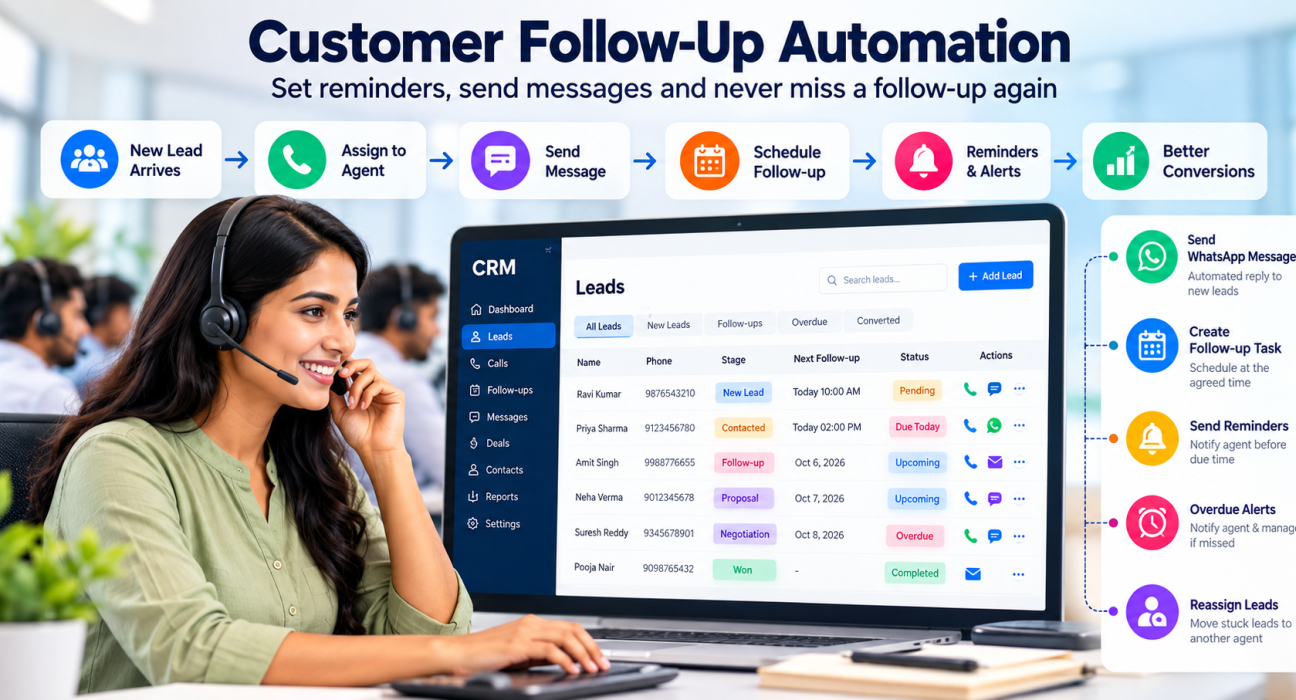
Customer follow-up automation means setting rules in your CRM so that follow-up tasks happen without anyone remembering to do them. When an agent logs “Call back on Friday”, the CRM creates the task, sends a reminder and alerts the manager if it is missed. It handles the admin around a conversation. The conversation itself stays with your people.
What to Automate, and What Not To
A simple test helps: if a task is repetitive, rule-based and tied to a deadline, automate it. If it needs judgement or tact, don’t.
| Task | Automate? | Why |
|---|---|---|
| Creating the next follow-up from a call outcome | Yes | Callbacks stop depending on memory |
| Reminders and overdue alerts | Yes | Deadlines are what automation is good at |
| First acknowledgement to a new lead | Yes, with an approved template | Speed matters more than polish here |
| Retrying unanswered calls | Yes | The pattern is simple and predictable |
| Reassigning stuck leads | Yes, with a manager’s eye on it | Idle leads lose value quickly |
| Explaining price or handling an objection | No | Needs listening, not a rule |
| Closing | No | Depends on the person on the other end |
How a Follow-Up Rule Works
Every rule has a trigger, an action and, sometimes, a condition. The trigger is the event: a new lead arrives, a call outcome is logged, a stage changes or a follow-up becomes overdue. The action is what the CRM does next, such as creating a task, sending an SMS or WhatsApp message, assigning an agent, adding a tag or alerting a manager.
A condition narrows things down. For example, “only for leads from the property portal” or “only for hot leads”. Most tools let you chain several actions to one trigger, so a single event can assign the lead, send a message and create the first-call task together.
Seven Rules Worth Building First
1. New lead: assign, acknowledge, schedule the first call
This is the rule with the clearest payoff. A Harvard Business Review audit of 2,241 US companies found that firms contacting a lead within an hour were nearly seven times as likely to qualify it as firms that waited even an hour longer. The data is from US online leads and dates from 2011, so treat the number as a signal, not a promise. But it explains why the first response should never wait for someone to notice a new row in a sheet.
2. “Call back” outcome: book the time the customer chose
When the agent logs a callback, the CRM should ask for the date and time, create the follow-up and remind the agent shortly before it is due. It sounds basic. It is also the rule that fixes the Friday problem.
3. “Not reachable”: retry on a pattern
Most calls go unanswered. Set a pattern, such as one more try later the same day and another the next day at a different hour, then move the lead to a different list after a fixed number of attempts. Without a rule, agents either give up too early or keep dialing the same dead number.
4. “Interested”: send the details, plan the next step
Once a customer shows interest, send the brochure, fee structure or property details on WhatsApp or email, and schedule a follow-up for a couple of days later. The customer gets something concrete and the agent gets a reason to call again.
5. “Proposal sent”: remind, then escalate
Quotes go quiet easily. Create a reminder for the agent, and alert the manager if the lead shows no activity after a set period.
6. Overdue follow-up: alert the agent, then the manager
An overdue task should never go unnoticed. Alert the agent first. If it stays overdue, alert the manager or reassign the lead.
7. Renewal date: remind early
For insurance, subscriptions or courses, create the reminder well before the renewal date. Early calls feel like service. Late calls feel like chasing.
A Sample Sequence for a New Lead (Hypothetical)
This is an example to adapt, not a benchmark. Test the timings against your own data.
| When | What happens | What the CRM does |
|---|---|---|
| Minute 0 | New lead arrives | Assigns an agent, sends an acknowledgement, creates the first-call task |
| Same day | First call unanswered | Creates a retry for a different time slot |
| Day 1 | Still not reached | Creates a second retry and sends a short message |
| Day 2 | Call connects, lead is “Interested” | Sends details, creates a follow-up for day 4 |
| Day 4 | Follow-up due | Reminds the agent |
| Day 5 | Follow-up still not done | Alerts the agent and the manager |
| After the last attempt | No response | Moves the lead to a nurture list or closes it with a reason |
Setting It Up Without Breaking Anything
- Write down what happens today. For each call outcome, note what the agent is supposed to do next. The gaps show you where rules are needed.
- Shorten your outcome list. Five or six outcomes are easier to automate than fifteen.
- Build three rules, not ten. New-lead assignment, callback scheduling and overdue alerts are a good start.
- Write the templates once, carefully. Short, polite and specific. Get them approved where required.
- Run it with two or three agents for a week. Ask what annoyed them. Fix that, then roll it out.
A Hypothetical Counselling Team
Picture an education institute getting enquiries from ads. Each new lead is assigned to a counsellor and gets an acknowledgement. When the counsellor logs “Interested”, the CRM sends the course details on WhatsApp and books a follow-up two days later.
If that follow-up is still open the next morning, the admissions head gets an alert. The counsellor still has the real conversation with the parent. The system only makes sure that conversation happens.
Keeping Automated Follow-Ups From Feeling Automated
Customers can tell when a message was written for everyone. Use their name, mention the course, property or policy they asked about, and keep messages short. Most importantly, stop the sequence the moment a customer replies. Nothing is more irritating than getting a “just checking in” message after you have already spoken to the agent.
Frequency needs the same care. Two or three well-timed touches work better than a daily nudge, and an opt-out request should end contact immediately.
Compliance Basics for India
Automation does not remove your legal duties. Screen numbers against Do Not Call (DNC) preferences, respect calling hours and keep records of consent where it applies. For SMS and WhatsApp, business messages generally need approved templates. Rules change, so confirm your setup with a legal adviser.
What to Measure
Once rules are live, watch a few numbers: how long a new lead waits for its first call, what share of follow-ups are done on time, how many are overdue by agent, and how many leads have no next action at all. Compare conversion by stage and source after a few weeks. If on-time follow-ups rise but conversion does not, look at the quality of the calls, not just their timing.
Mistakes That Quietly Undermine Automation
- Automating a messy process. A rule cannot fix stages that nobody understands.
- Building too much, too soon. Ten rules in week one means nobody knows which one fired.
- No stop condition. Sequences must end on a reply or an opt-out.
- Alerts with no owner. An overdue alert only works if someone is responsible for acting on it.
How TeleCallingCRM Supports Follow-Up Automation
TeleCallingCRM is built for outbound calling teams. According to its website, it includes:
- A no-code workflow builder with triggers for new leads, call outcomes, stage changes and due follow-ups
- Actions such as sending SMS, email or WhatsApp messages, auto-assigning, tagging and changing stages, with several actions chained together
- Smart follow-ups that can create the next follow-up from the call outcome, with sooner reminders for hot leads
- Reminders, overdue alerts and Today, Overdue and Upcoming lists
- Manager alerts, a live war room, assignment rules, de-duplication and DNC enforcement
The site lists plans from ₹999 per month and a 3-day free trial, which is enough to set up two or three rules and see how they behave with real leads. Current details are on the pricing page. Teams in education and insurance may find the industry pages relevant, and the guide on how to choose the best telecalling CRM covers selection in more depth. During the trial, check that the triggers and actions available match how your team actually works.
Frequently Asked Questions
What is customer follow up automation?
It is the use of CRM rules to create follow-up tasks, send reminders and messages, and raise alerts without manual effort. Agents still handle the conversations, while the system keeps the promises on time.
How do I automate follow-ups in a CRM?
Start by simplifying your call outcomes. Then link a few triggers, such as a new lead or a “Call back” outcome, to actions like creating a task, sending a message or alerting a manager. Try it with a small group before rolling it out.
Which follow-ups should stay manual?
Anything that needs judgement. Price discussions, objections and negotiations belong to a person. Automate the reminders, retries and first acknowledgements around them.
How many times should I follow up with a lead?
There is no universal number. It depends on your industry, the sales cycle and how interested the lead is. Set a sensible limit, vary the time and channel, and stop if the customer says no or asks you to stop.
Can a CRM send WhatsApp messages automatically?
Many can, but business messages generally need approved templates, and customers should have agreed to be contacted. Check the rules for your use case and how your CRM handles templates.
Is this worth it for a small team?
Yes, often more than for a large one, because everyone is busy and follow-ups slip. Start with callback reminders and overdue alerts. Add more only when those work.
Conclusion
Customer follow up automation doesn’t need to be clever. A few clear rules that create tasks, send timely reminders and flag what is overdue will fix most of what goes wrong. Let the CRM handle the routine, keep your agents on the real conversations and review the results every few weeks.
If you want to see how these workflows look in practice, you can book a demo of a telecaller CRM and set up your first rules with your own leads.