

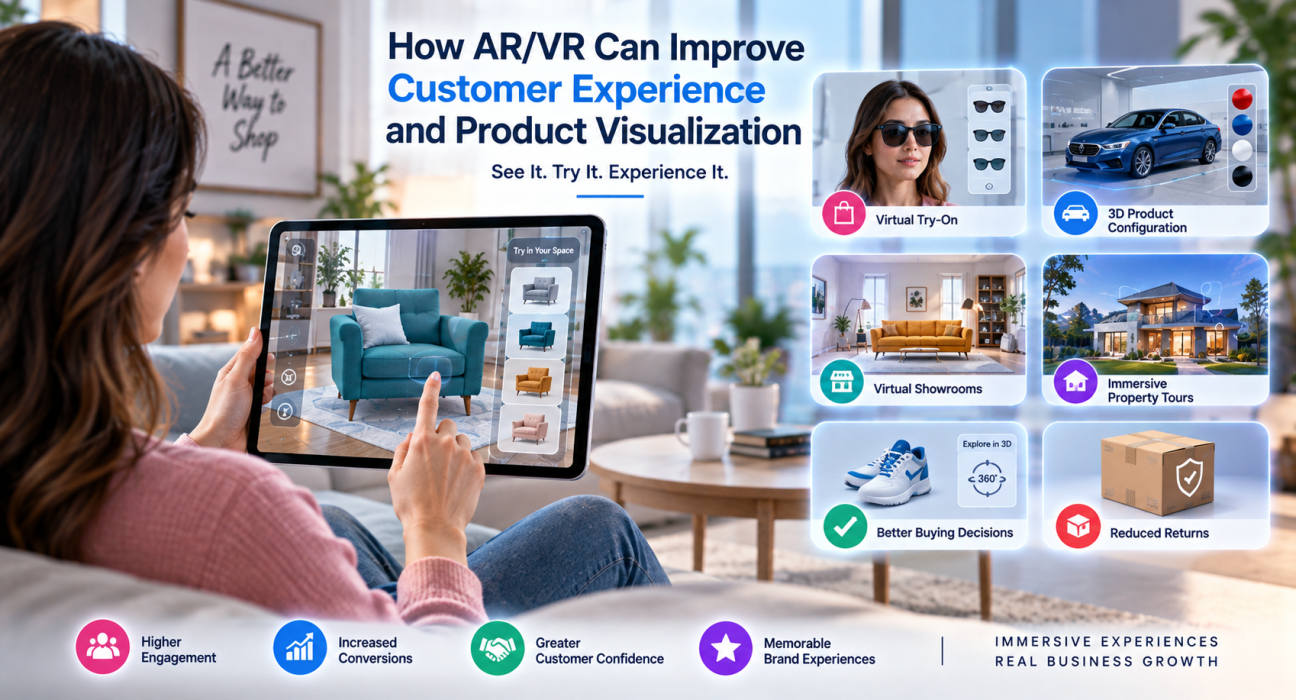
Customers today don’t just want to read product descriptions or scroll through photos – they want to see, try, and experience products before they buy. This shift in expectations is exactly why augmented reality (AR) and virtual reality (VR) have moved from novelty tech to genuine business tools. A strong AR/VR customer experience strategy helps companies close the gap between “looking at a product online” and “actually understanding what it will look, feel, and function like.”
For businesses trying to reduce returns, increase conversions, or simply stand out in a crowded digital market, AR and VR offer a practical way to make product visualization more realistic and buying decisions more confident. This article breaks down how AR/VR customer experience tools work, where they create the most value, and how businesses can decide if – and how – to adopt them.
What Is AR/VR Customer Experience?
AR/VR customer experience refers to the use of augmented reality and virtual reality technology to help customers interact with products, services, or environments in a more immersive and informative way than traditional photos, videos, or text.
- Augmented reality (AR) overlays digital elements – like a 3D product model – onto the real world, usually through a smartphone camera. Think of trying on a pair of glasses virtually or seeing how a couch would look in your living room.
- Virtual reality (VR) creates a fully digital environment that the user enters, typically through a headset. This is common in real estate walkthroughs, virtual showrooms, and training simulations.
Both technologies aim to solve the same core problem: customers can’t physically touch or test a product before purchasing it online, and that uncertainty often leads to hesitation, cart abandonment, or returns.
Why AR/VR Matters for Product Visualization
Product visualization is one of the biggest challenges in e-commerce and digital sales. A flat image can’t fully communicate scale, texture, fit, or how something will look in a real environment. AR and VR close that gap in a few key ways.
1. Reduces the Guesswork in Buying Decisions
When customers can see a product from every angle, resize it to scale, or place it virtually in their own space, they make more informed decisions. This is particularly valuable for furniture, home decor, appliances, and fashion, where “how will this actually look” is the main hesitation point.
2. Builds Buyer Confidence Without a Physical Store Visit
AR/VR essentially recreates part of the in-store experience – trying something on, walking through a space, or examining a product closely – without requiring the customer to visit a physical location. This is especially useful for businesses with limited retail footprints or global customer bases.
3. Improves Product Understanding for Complex Items
For technical products, machinery, or anything with moving parts, AR overlays can show how components fit together or function, which is far more effective than a written manual or static diagram.
4. Creates a Memorable Brand Interaction
Beyond function, immersive experiences tend to be more engaging and shareable, which can support brand awareness and word-of-mouth marketing.
Where AR/VR Customer Experience Delivers the Most Value
Not every business needs AR/VR, and it’s not a one-size-fits-all investment. It tends to deliver the strongest return in industries where visualization directly affects purchase confidence.
| Industry | Common AR/VR Use Case |
|---|---|
| E-commerce & Retail | Virtual try-on for clothing, accessories, and footwear |
| Furniture & Home Goods | Placing 3D furniture models in a real room via AR |
| Real Estate | Virtual property tours and walkthroughs |
| Automotive | 3D vehicle configurators showing colors, trims, and interiors |
| Beauty & Cosmetics | Virtual makeup or skincare try-on tools |
| Manufacturing & B2B | AR-assisted equipment training and remote support |
| Education & Training | VR simulations for hands-on skill-building |
| Healthcare | AR visualization for patient education and procedure previews |
How Does AR/VR Improve the Customer Journey?
Direct answer: AR/VR improves the customer journey by reducing uncertainty at the exact moments customers usually hesitate – before adding to cart, before booking, and before committing to a purchase – through realistic previews and interactive product exploration.
Here’s how that plays out across a typical journey:
- Awareness stage – Interactive AR content on social media or ads increases engagement compared to static images.
- Consideration stage – Customers use AR to compare how products would fit their needs (size, color, placement) instead of relying on imagination.
- Decision stage – Confidence from visualization reduces cart abandonment and speeds up the decision to purchase.
- Post-purchase stage – Fewer mismatches between expectation and reality lead to fewer returns and higher satisfaction.
Key Benefits of AR/VR for Businesses
- Lower return rates, especially for size- or appearance-sensitive products
- Higher engagement time on product pages or apps
- Increased conversion rates driven by improved buyer confidence
- Differentiation from competitors still using standard product pages
- Better customer support, using AR for visual troubleshooting instead of text-based instructions
- Scalable demonstrations without needing physical inventory in every location
Challenges to Consider Before Adopting AR/VR
AR/VR isn’t a plug-and-play solution, and businesses should go in with realistic expectations.
- Development cost and complexity – Building high-quality 3D models and AR/VR experiences requires specialized development skills.
- Device and platform compatibility – AR features need to work smoothly across iOS, Android, and web browsers, which requires careful technical planning.
- Content maintenance – 3D assets need to be updated as products change, which adds ongoing operational work.
- User adoption – Not all customers are comfortable with AR/VR yet, so it typically works best as an enhancement, not a replacement, for traditional product pages.
- Measuring ROI – Businesses need clear goals (reduced returns, higher conversion, etc.) to evaluate whether the investment is paying off.
How to Get Started With AR/VR Customer Experience
If a business is considering AR/VR, a phased approach tends to work better than a full-scale rollout.
Step 1: Identify the Right Use Case
Start with the part of the customer journey where visualization gaps cause the most hesitation or returns.
Step 2: Pilot With a Small Product Set
Test AR/VR features on a limited selection of products before expanding, so the business can measure impact without a large upfront investment.
Step 3: Choose the Right Development Partner
Building AR/VR experiences requires expertise in 3D modeling, mobile app development, UI/UX design, and sometimes AR SDKs like ARKit or ARCore. Businesses that don’t have this expertise in-house typically work with specialized software or mobile app development companies.
This is where a platform like GoFirms can help. Businesses can use GoFirms to research and compare technology companies, mobile app developers, and UI/UX agencies with relevant experience, making it easier to find a partner suited to AR/VR product development rather than starting the vendor search from scratch.
Step 4: Measure Results and Iterate
Track metrics like conversion rate, return rate, and engagement time before and after launch to determine whether to expand the feature further.
AR vs. VR: Which One Is Right for Your Business?
| Factor | AR | VR |
|---|---|---|
| Best for | Product try-on, placement, overlays | Full immersive environments, simulations |
| Hardware needed | Smartphone camera | Headset (higher barrier to entry) |
| Typical use cases | E-commerce, retail, real-time visualization | Real estate tours, training, virtual showrooms |
| Cost to implement | Generally lower | Generally higher |
| Customer adoption | Higher (no special hardware) | Lower (requires headset access) |
For most customer-facing e-commerce and retail use cases, AR tends to have a lower barrier to entry and broader reach since it works directly through a smartphone. VR is often better suited to high-consideration purchases like real estate or training environments where full immersion adds more value.
FAQs
What is AR/VR customer experience? AR/VR customer experience refers to using augmented or virtual reality to help customers visualize, interact with, or test products digitally. It’s commonly used in e-commerce, real estate, and retail to reduce buying uncertainty and improve product understanding before purchase.
Does AR/VR actually reduce product returns? Improved product visualization can help customers set more accurate expectations about size, fit, and appearance, which often leads to fewer mismatches between what customers expect and what they receive. Actual results vary by industry and implementation, so businesses should track their own return-rate data after launch.
Is AR or VR better for e-commerce? AR is generally more practical for e-commerce since it works through a smartphone camera without requiring special hardware. VR tends to suit higher-immersion use cases like virtual showrooms or property tours, where customers are willing to invest more time and, sometimes, use a headset.
How much does it cost to build an AR/VR feature? Cost depends heavily on the complexity of the 3D models, the platforms supported, and whether the feature is a simple AR overlay or a full VR environment. Businesses should request scoped quotes from experienced developers rather than relying on general estimates.
Do small businesses need AR/VR? Not necessarily. AR/VR tends to deliver the most value for businesses selling visually or spatially complex products, such as furniture, fashion, or real estate. Smaller businesses should evaluate whether visualization is actually a barrier to purchase before investing.
How do businesses find the right AR/VR development partner? Businesses typically look for software or mobile app development companies with prior 3D modeling and AR/VR experience. Platforms like GoFirms allow businesses to research and compare relevant technology companies based on their focus areas and services.
Can AR/VR be added to an existing website or app? In many cases, yes. AR features can often be integrated into existing mobile apps or websites using AR SDKs, though the level of effort depends on the current tech stack and the complexity of the desired experience.
Conclusion
AR/VR customer experience is no longer just a futuristic add-on – it’s becoming a practical tool for businesses that want to close the gap between digital browsing and real-world confidence. By allowing customers to visualize products more accurately, whether through a quick AR try-on or a full VR walkthrough, businesses can reduce hesitation, cut down on returns, and create a more engaging buying journey.
The right approach depends on the product, the audience, and the specific point in the customer journey where visualization matters most. Businesses exploring this shift don’t need to figure it out alone – researching and comparing experienced technology and development partners through a platform like GoFirms is a practical first step toward building an AR/VR experience that actually fits business goals.