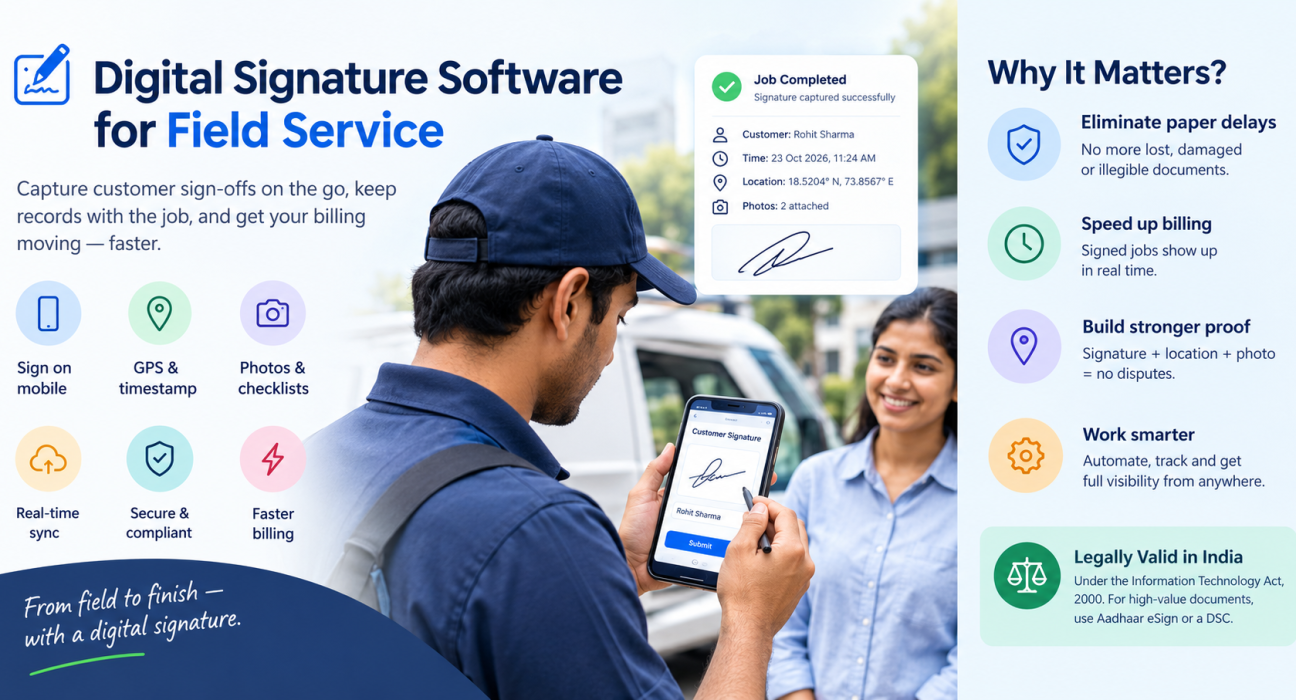
Digital Signature Software for Field Service Documentation
A technician finishes a repair, gets the customer’s signature on a carbon-copy job sheet, and drops it at the office three days later. By then the ink is smudged, a field is blank, and billing is waiting on a document nobody can find.
Digital signature software for field service removes that gap. The customer signs on the technician’s phone at the moment the job is done, and the record is stored with the job. This guide covers how it works, where it helps, what the law says in India, and how to choose a tool.
What Is Digital Signature Software for Field Service?
Digital signature software for field service is a mobile-first tool that lets customers sign off on completed work, deliveries or inspections on the field employee’s phone. The signature is attached to the job record along with details such as time, location and photos.
It replaces paper job cards, delivery challans and service reports that have to be signed by hand, carried back to the office and filed.
One distinction matters here. In Indian law, a “digital signature” strictly means a certificate-based signature, while “electronic signature” is the broader category. In everyday field operations, most teams use “digital signature” to mean any on-device signature capture. We cover the legal side below.
Why Paper Documentation Slows Down Field Service
Paper-based sign-offs cause problems that most operations managers will recognise:
- Delayed billing. Invoices cannot go out until signed job sheets reach the office.
- Lost or damaged documents. Paper gets wet, torn, misplaced or left in a vehicle.
- Illegible or incomplete forms. Handwriting, missing fields and unsigned pages lead to disputes.
- No proof of when or where the job was done. A paper signature carries no location or timestamp.
- Manual data entry. Someone re-types the paper record into a system, which adds errors and delay.
- Customer disputes. Without clear proof of completion, “the work was never done” is hard to counter.
How Digital Signatures Simplify Field Service Documentation
1. Sign-off happens at the job site
The customer signs on the technician’s phone before the technician leaves. There is no waiting for paperwork to travel back, so the record exists the moment the job ends.
2. The signature becomes part of the job record
A digital signature is attached to the task, along with the checklist, photos and notes. Managers and finance teams find everything in one place instead of chasing paper.
3. Documentation can be made mandatory
Software can require a signature before a job is marked complete. That makes proof of service the default rather than something that depends on the technician remembering.
4. Context backs up the signature
A signature is stronger evidence when it comes with a timestamp, a GPS location and photos. Together these show that the right person was at the right place at the right time.
5. Billing and reporting get faster
When completed, signed jobs show up in real time, finance can invoice sooner and operations can see what is pending, completed or disputed.
Where Digital Signatures Are Used in Field Operations
| Use Case | What Gets Signed |
|---|---|
| Field service and repair | Job completion reports, AMC visit sheets, installation sign-offs |
| Logistics and last-mile delivery | Proof of delivery (POD), receipt of goods |
| Collections and microfinance | Payment receipts, recovery acknowledgements |
| Facility management | Housekeeping and maintenance round confirmations |
| Telecom and utilities | Network rollout or meter visit acknowledgements |
| Solar and EV services | Site survey and installation acceptance |
| Insurance and banking | Claim survey and field verification acknowledgements |
Are Digital Signatures Legally Valid in India?
For most business documents, yes, provided the method meets the requirements of the Information Technology Act, 2000. Section 5 of the IT Act gives electronic signatures the same standing as handwritten ones. Section 3 covers certificate-based digital signatures, while Section 3A creates a wider framework for electronic signatures using reliable methods, including Aadhaar-based eSign. leegalitytaxguru
The distinction matters in practice. A basic electronic signature, such as a scanned image or a typed name, does not automatically meet all the Section 3A requirements and carries weaker legal standing than a DSC or Aadhaar eSign. Certain categories of documents are also excluded from the Act’s scope. legistifylegistify
A practical way to think about it:
- For routine operational documents such as job completion, delivery acknowledgement and visit confirmation, an on-device signature captured with supporting evidence is a widely used and practical standard.
- For high-value contracts, regulated documents or agreements likely to be contested, consider a method such as Aadhaar eSign or a DSC, and confirm requirements with your legal advisor.
This article is general information, not legal advice.
What to Look for in Digital Signature Software for Field Service
Use this checklist when comparing tools:
- Offline capture. Field teams often work without a stable network. The app should capture signatures offline and sync later.
- Mandatory sign-off rules. A job should not close without the required proof.
- Supporting evidence. Look for timestamps, GPS stamps, photos and OTP verification alongside the signature.
- Custom forms and checklists. Each business documents different things, so the form should be configurable.
- Manager visibility. You need real-time dashboards showing which jobs are signed, pending or overdue.
- Integration options. Data should flow into your CRM, ERP or accounting system without re-entry.
- Simple pricing. Check whether the signature feature is included or sold as an add-on.
- Ease of use for technicians. Big buttons and a fast flow matter more than a long feature list.
How to Roll Out Digital Signatures in Your Field Team
- List your paper documents. Note every form that needs a customer or employee signature today.
- Decide which sign-offs are mandatory. Start with the ones tied to billing, such as job completion or delivery.
- Build the digital version. Recreate each form with the fields, checklist and signature step it needs.
- Pilot with one team. Run it for a few weeks and note where technicians slow down.
- Train on the customer conversation. Technicians should know how to hand over the phone and explain what is being signed.
- Review the data. Track pending sign-offs, disputes and time from job completion to invoice.
- Roll out to all teams. Then retire the paper process.
How FieldExecutives Supports Digital Proof of Service
Businesses looking to simplify these processes can use field force management software such as FieldExecutives, which brings job execution and proof capture into one platform.
Based on the FieldExecutives platform, here is what is relevant to documentation:
- Signature, photo and OTP proof capture. Field executives capture proof before a job can be closed, which gives managers proof of work as well as proof of presence.
- Guided job cards with checklists and SLA timers. Each job shows where to go, whom to meet and what to complete.
- Offline-first mobile app. Visits can be finished and proof captured without a network, and everything syncs when the device reconnects.
- Custom forms builder. Teams can build forms and workflows around their own documentation needs without writing code.
- Geofenced check-ins and GPS-stamped activity. This ties a visit to a real location and time.
- Real-time KPIs and reports. Managers see completed and pending work as it happens.
FieldExecutives also lists API-based connections with CRM, ERP, accounting and HR systems, which helps when completed job data needs to reach your billing process.
[Internal Link Opportunity: Field Service & Repair industry page]
Best Practices for Digital Field Documentation
- Keep forms short. Ask only for what you will use later.
- Make proof a rule, not a request. Required fields prevent skipped steps.
- Capture the signer’s name. A signature alone does not say who signed.
- Pair signatures with photos. A before-and-after photo plus a signature is stronger than either alone.
- Review exceptions weekly. Look at jobs closed without sign-off and ask why.
- Be transparent with customers. Tell them what they are signing and why it is on a phone.
- Respect privacy. Store customer data securely and follow your data protection obligations.
Conclusion
Paper sign-offs slow down billing, hide problems and create disputes. Digital signature software for field service moves the sign-off to the job site, attaches it to the job record with supporting evidence, and gives managers real-time visibility. For routine documents it is a practical standard. For high-value agreements, use a legally stronger method such as Aadhaar eSign or a DSC.