Best Appointment Scheduling CRM for Follow-Ups: How to Choose the Right One
A lead says “call me on Thursday after 4 PM.” Your telecaller notes it in a diary, a WhatsApp chat or an Excel cell. On Thursday, nobody remembers, and the lead goes to a competitor who called on time.
This is the problem an appointment scheduling CRM solves. Businesses that book site visits, demos, counselling sessions or consultations through phone calls can use a CRM built for appointment scheduling and follow-ups to make sure every promised call or meeting actually happens. This guide explains what to look for, how to set up the process, and which mistakes to avoid.
What Is an Appointment Scheduling CRM?
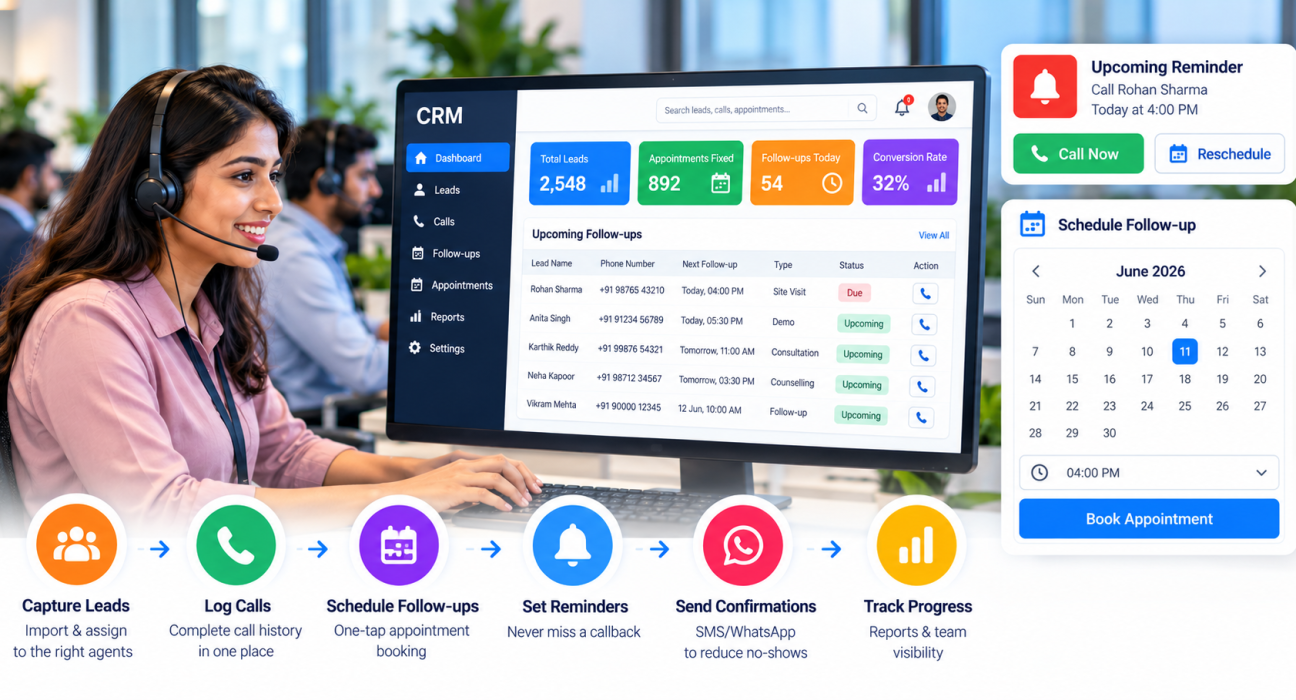
An appointment scheduling CRM is software that stores your leads, lets your team book appointments or callbacks against each lead, and reminds the right person at the right time. It also keeps the call history, notes and outcome in one place, so the next conversation starts with full context.
In simple terms, it connects three things: the lead, the commitment made to the lead, and the reminder to keep that commitment.
Why Missed Follow-Ups Cost Appointments
Most appointments are not lost because the lead said no. They are lost because the follow-up was late, forgotten or handled by someone who did not know the earlier conversation.
Common causes in Indian sales and calling teams:
- Callback times are written in personal notebooks or chats.
- Leads are spread across Excel sheets, so nobody has a single view.
- Telecallers change, and the new person has no call history.
- Managers cannot see which follow-ups are overdue until a lead complains.
- Reminders depend on memory, not on a system.
A good CRM removes these gaps. It does not replace the telecaller’s skill, but it removes the guesswork around timing.
Two Kinds of Appointment Scheduling Tools
Before comparing products, decide which problem you are solving. “Appointment scheduling” can mean two different things.
| Type | Best for | How appointments are created | Example need |
|---|---|---|---|
| Booking-page tools | Inbound customers who choose their own slot | Customer picks a slot on a booking page | Salon, clinic or consultant with an online calendar |
| Calling-led CRMs | Outbound or phone-first teams | Telecaller agrees a time on a call and logs it | Sales team booking demos, site visits or admissions counselling |
Many Indian businesses generate leads from ads and listing portals, then convert them by phone. For them, the second type usually fits better, because the appointment is created during a conversation, not on a website.
Some businesses need both. In that case, check whether the CRM can work alongside your booking or calendar tool.
Features to Look For in an Appointment Scheduling CRM
1. One-tap follow-up and callback scheduling
The telecaller should be able to set the next action right after the call, with a quick time preset or a custom date. If scheduling takes five clicks, agents will skip it.
2. Reminders and overdue alerts
A reminder before the call is due is useful. A flag when it becomes overdue is essential. Managers should also see today’s, overdue and upcoming follow-ups at a glance.
3. Complete call history on every lead
Before calling back, the agent should see previous call notes, outcomes, recordings and messages. This avoids repeating questions and makes the lead feel remembered.
4. Lead capture and assignment
Appointments start with leads. Look for lead import, de-duplication, and rules that route each lead to the right agent. Integration with your lead sources saves manual entry.
5. Pipeline stages
An appointment is a stage, not the end. Stages such as “Appointment Fixed,” “Visited” and “Won” show how many bookings turn into business.
6. Messaging
A WhatsApp or SMS confirmation after booking reduces no-shows. Check whether templates and scheduling are available.
7. Reports and team visibility
You should be able to see follow-ups completed, calls made and connect rate by agent. Without reporting, you cannot improve the process.
8. Mobile access
Field teams and remote telecallers need to schedule and check follow-ups from their phones.
9. Compliance controls
For outbound calling in India, look for DNC list handling and calling-hour controls. Confirm current TRAI rules with your compliance advisor.
How to Set Up an Appointment and Follow-Up Process
A CRM works only when the process is clear. Here is a simple approach any team can adopt.
- Define your appointment types. Examples: site visit, demo, counselling slot, branch visit.
- Create pipeline stages. Add stages like New, Contacted, Appointment Fixed, Appointment Done and Closed.
- Set a follow-up rule. For example: every call must end with a next action and date, unless the lead is closed or marked do-not-call.
- Assign ownership. One lead, one owner, so there is no confusion about who calls back.
- Send a confirmation. After booking, send a short message with the date, time and location.
- Review daily. The manager checks overdue follow-ups each morning.
- Review weekly. Look at how many appointments were fixed, how many were attended and which agents need coaching.
Practical Examples by Industry
These are hypothetical examples to show how the process can work.
Real estate. A telecaller calls an enquiry from a property portal and fixes a Saturday site visit. The CRM holds the follow-up, and a reminder prompts a confirmation call on Friday. If the buyer asks to reschedule, the new time is logged on the same lead.
Education. A counsellor speaks to a student’s parent and agrees a campus visit. The lead moves to an “Appointment Fixed” stage. If the parent does not answer, the next attempt is scheduled for the evening.
Healthcare. A clinic’s front desk calls patients who enquired about a health package and books a preferred time. Follow-up reminders help staff confirm the slot a day earlier.
Insurance and finance. An agent promises to share a quote and call back on a given day. The reminder ensures the quote discussion happens as promised.
If your business is in one of these areas, you can see how CRM workflows are described on the real estate, education and healthcare industry pages.
Common Mistakes to Avoid
- Choosing by feature count. A long feature list means little if your agents find the follow-up screen slow.
- Treating every lead the same. Hot leads need faster reminders than cold ones.
- No next step after a call. If the call outcome is saved but the next action is blank, the lead will go cold.
- Ignoring no-shows. Track appointments missed and set a rule to reschedule within a day or two.
- Skipping training. Even a simple CRM needs a short onboarding for agents and managers.
- Not checking calendar needs. If you need public self-booking or two-way calendar sync, confirm it before buying.
How TeleCallingCRM Can Help
TeleCallingCRM is a telecalling CRM for outbound sales teams in India. It is not a public online booking-page tool, and it is useful to be clear about that. Its strength is the calling-led workflow, where appointments and callbacks come out of phone conversations.
Based on the features listed on its website, teams can:
- Schedule follow-ups in one tap with quick presets or a custom date.
- Get reminders and overdue alerts, with priority-aware timing so hot leads are reminded sooner.
- Auto-create the next follow-up based on the call outcome.
- See Today, Overdue and Upcoming lists in the admin panel.
- Keep call history, notes and recordings on each lead’s timeline.
- Use custom pipeline stages, such as “Appointment Fixed.”
- Send WhatsApp, SMS and email templates for confirmations.
- Use workflow automations, including a follow-up-due trigger.
- Work from the Android and iOS mobile app.
- Import leads with de-duplication and connect sources such as Facebook and Instagram Lead Ads, Google Ads, 99acres, MagicBricks and JustDial.
The features page does not currently list a public booking page or calendar sync. If you need those, ask the team during a demo, or keep a booking tool alongside the CRM.
You can compare plans on the pricing page. The website mentions a 3-day free trial, so a small team can test the follow-up workflow before deciding. If you are still comparing options more broadly, this guide on how to choose the best telecalling CRM may help.
Quick Checklist Before You Choose
Ask these questions during your trial or demo:
- Can an agent schedule a follow-up in under 10 seconds?
- Are overdue follow-ups clearly visible to both agent and manager?
- Can I see the full history of a lead before calling?
- Does it work well on mobile?
- Can I track appointments through pipeline stages?
- Can I send confirmation messages from the same system?
- Does it support my compliance needs, such as DNC handling?
- Do I need online self-booking or calendar sync, and is it available?
Frequently Asked Questions
What is the best CRM for appointment scheduling and follow-ups?
The best option depends on how appointments are created. If customers book themselves online, a booking-page tool fits. If your team books appointments over phone calls, a calling-led CRM with follow-up reminders, call history and pipeline stages is usually a better fit.
What features should an appointment scheduling CRM have?
At minimum: quick follow-up scheduling, reminders, overdue alerts, call history, lead assignment, pipeline stages, messaging for confirmations, reports and mobile access. Compliance controls matter if you make outbound calls.
Can a telecaller CRM be used for appointment scheduling?
Yes, if appointments come from phone conversations. Telecallers can log the agreed date as a follow-up or move the lead to an appointment stage. Check whether you also need public booking links or calendar sync, as not every telecaller CRM offers them.
How does a CRM reduce missed follow-ups?
It stores the next action against each lead, sends reminders before it is due, and flags it when overdue. Managers can also see pending follow-ups by agent, so delays are caught early instead of after the lead is lost.
Is a CRM better than Excel for follow-ups?
For small lists, Excel can work. As leads and agents grow, spreadsheets make it hard to track call history, ownership and reminders. A CRM gives one shared record and automatic reminders.
How can I reduce appointment no-shows?
Send a confirmation after booking, remind the lead a day before, and call to reconfirm for high-value appointments. Track no-show rates by agent and source, and reschedule quickly. A CRM helps by keeping these steps visible and consistent.
Do small businesses need an appointment scheduling CRM?
If you handle more leads than one person can remember, yes. Even a small team of three to five callers benefits from shared follow-up lists, because missed callbacks are costly when lead volume is limited.
Conclusion
The best appointment scheduling CRM is the one your team will actually use every day. Start by deciding whether your appointments come from online booking or phone calls. Then check for fast follow-up scheduling, clear reminders, complete call history and simple reporting.
Build a clear process too: every call ends with a next step, every lead has an owner, and managers review overdue follow-ups daily. If your team works mainly by phone, you can request a demo of the telecaller CRM and test whether its follow-up workflow suits your business.