How to Automate Follow-Ups Using TeleCalling CRM
Most telecalling teams do not lose leads because the first call went badly. They lose them because the second call never happened. A callback was promised, the agent got busy, and the lead went cold. With telecalling CRM automation, the system takes over the remembering, reminding and chasing, so your agents can spend their time on conversations.
This guide explains what you can automate, how to set it up step by step, and where human judgement should stay in charge.
What Is Telecalling CRM Automation?
Telecalling CRM automation means letting your CRM handle repeat follow-up work: assigning new leads, setting callback reminders, flagging overdue calls and sending SMS, email or WhatsApp messages when a trigger happens, such as a new lead or a stage change. Agents focus on the conversation, while the system tracks who needs a call next.
Automation does not mean a robot calls your leads. It means your process runs the same way every time, whoever is on shift.
Why Manual Follow-Ups Fail
Most missed follow-ups come from process gaps, not lazy agents. Common causes include:
- Callbacks noted in a diary, WhatsApp chat or Excel sheet that nobody checks
- No fixed rule for how soon a new lead should get the first call
- Notes that do not say what was promised in the last call
- Managers who cannot see which follow-ups are overdue until the month-end review
- Leads reassigned between agents without any history
Each gap is small. Together, they decide how many enquiries turn into customers.
What You Can Automate (and What Should Stay Human)
Not every follow-up step should be automated. Use automation for repeatable steps and keep people on anything that needs judgement.
| Follow-up task | Automate? | Why |
|---|---|---|
| Assigning a new lead to an agent | Yes | Speed and fairness |
| Scheduling the next callback after a call | Yes, with agent confirmation | Removes manual diary work |
| Reminder before a callback is due | Yes | Prevents forgotten calls |
| Overdue alerts to agent or manager | Yes | Catches slips early |
| Confirmation or information messages | Yes | Same message every time |
| Price negotiation or objection handling | No | Needs a human |
| Deciding to drop or escalate a lead | Partly | Rules help, people decide |
How to Automate Follow-Ups in TeleCalling CRM: Step by Step
The steps below follow the features TeleCalling CRM lists on its website. Menu names and options may change, so check the latest documentation while setting up.
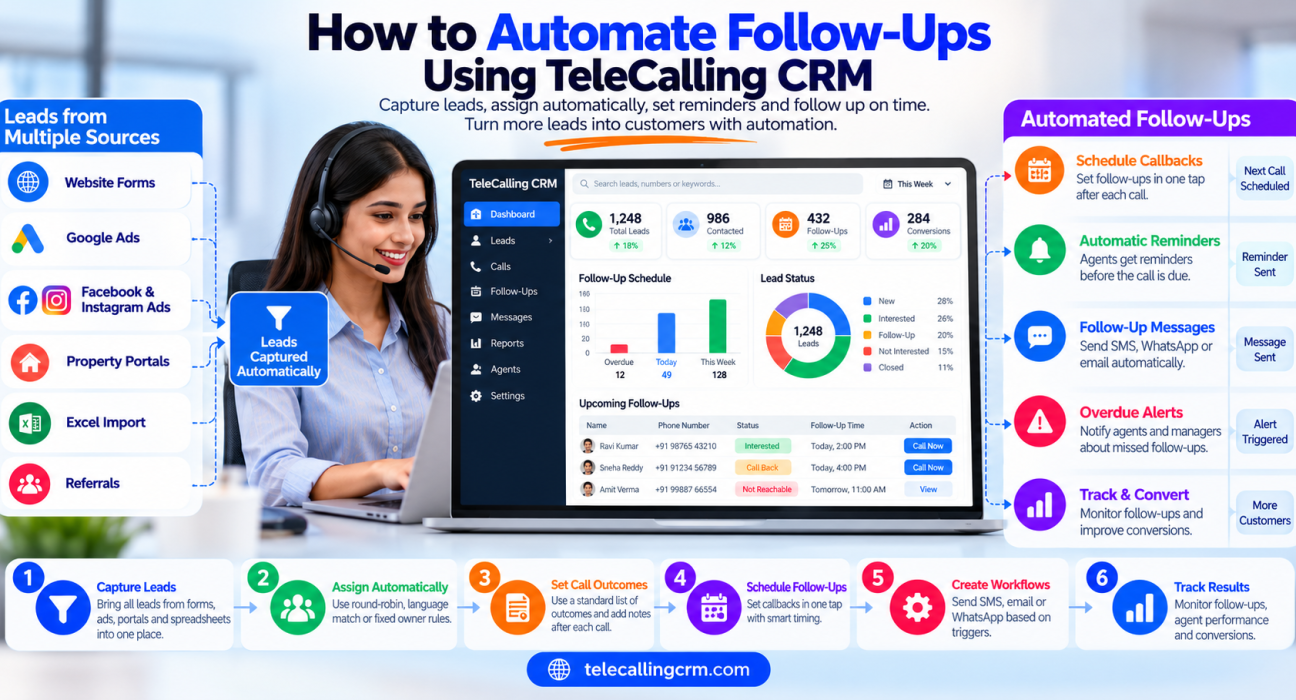
Step 1: Get Every Lead Into One Place
Automation only works on leads that are already in the system. Bring in enquiries from ads, portals, forms and spreadsheets so that nothing sits outside the CRM. TeleCalling CRM lists integrations for Facebook and Instagram Lead Ads, Google Ads, 99acres, Housing.com, MagicBricks, JustDial, Sulekha, TradeIndia, WordPress, Wix, Google Sheets and Zapier. You can also connect other sources through a webhook or Zapier. Duplicates and DNC numbers are screened on import.
Step 2: Assign Leads Automatically
The first follow-up is the first call, and it should not wait for a manager to forward the lead. Set assignment rules such as round-robin, language match or a fixed owner. The platform can also assign only to agents who are punched in, so a lead does not land with someone who is on leave.
Step 3: Standardise Call Outcomes
Follow-ups are only as good as the outcome recorded after each call. Decide a short, fixed list of outcomes, for example interested, call back later, not reachable, not interested and wrong number. In the mobile app, agents pick an outcome, add notes and schedule a follow-up straight after the call, then the dialer moves to the next lead.
Good notes matter here. The next agent, or the same agent three days later, should know exactly what was promised.
Step 4: Schedule Callbacks in One Tap
A callback should take seconds to set, otherwise agents skip it. TeleCalling CRM offers one-tap scheduling with quick presets or a custom date and time. Its smart timing can create the next follow-up automatically based on how the call went. Hot leads are reminded sooner, and reminders fire before the call is due.
Ask agents to review the suggested time, because they know the lead’s context better than any rule.
Step 5: Build Simple Workflows
TeleCalling CRM includes a no-code workflow builder. Triggers listed on the website include a new lead, a call event, a stage change and a follow-up becoming due. Actions include sending SMS, email or WhatsApp messages, auto-assigning, tagging, changing the stage, and chaining several actions together.
Start with two or three workflows:
- New lead arrives: assign to an agent and send a short acknowledgement message.
- Follow-up becomes overdue: alert the agent, and alert the team lead if it stays overdue.
- Lead moves to a key stage: send a relevant template, such as visit details or a document checklist.
Keep each workflow short. You can always add more later.
Step 6: Use Messages to Support Calls
Many leads do not pick up the first time, but they will read a message. Use WhatsApp, SMS or email templates after calls, such as “sorry we missed you, when is a good time?” or a confirmation of what you discussed. TeleCalling CRM supports SMS via MSG91 with DLT, email through your own SMTP and WhatsApp templates, with the conversation shown on one timeline per lead. Messaging needs your own provider details set up first.
Step 7: Check Your Follow-Up Reports
Review the Today, Overdue and Upcoming follow-up lists every day, and use the report builder to look at follow-ups by agent. Managers can watch the live dashboard for idle time and unfinished callbacks. Do this weekly: which stage has the most overdue follow-ups, and why?
Example Follow-Up Flows by Industry
These are hypothetical examples to show how rules can be designed. Adjust them to your own sales cycle.
Real estate (example): A buyer enquires on a property portal. The lead is auto-assigned, and the agent calls within the hour. If the buyer says “send details”, the agent schedules a callback for the next day and sends project details on WhatsApp. When the lead moves to “site visit planned”, a reminder is sent the day before the visit. You can read more in our guide to telecalling CRM for real estate.
Education (example): A parent enquires about admission. The counsellor calls, and the parent says they will discuss it at home. The counsellor sets a callback for two evenings later and sends the fee structure by SMS. If the callback becomes overdue, the team lead gets an alert.
Insurance (example): A prospect asks for a quote. After the call, the agent sets a follow-up for three days later. A workflow tags the lead as “quote shared” so it is easy to find for a second call. See how this works in what insurance teams gain with a telecalling CRM.
Common Mistakes to Avoid
- Automating too much too soon. Start with reminders and assignment, then add messages.
- Too many touches. Repeated messages annoy leads and hurt your brand. Set a sensible limit.
- Ignoring consent and DNC rules. Follow the Do Not Call and commercial communication rules that apply in India, and keep your calling-hours window in place. TeleCalling CRM lists DNC enforcement and a calling-hours window, but your team is still responsible for compliance. Check current TRAI guidelines or take legal advice.
- Vague call outcomes. If agents choose outcomes inconsistently, your automation will fire at the wrong time.
- No owner for overdue follow-ups. Decide who acts when a callback is missed.
- Never reviewing. Look at your rules monthly and remove what does not help.
How TeleCalling CRM Helps With Follow-Ups
TeleCalling CRM is built for outbound sales teams in India. For follow-ups, the relevant parts are lead capture, assignment rules, one-tap callback scheduling, smart reminders, overdue alerts, a no-code workflow builder, multi-channel messaging and follow-up reports. These features are listed as included in every plan.
If you are still comparing options, our guide on how to choose the best telecalling CRM lists what to check before you decide. A 3-day free trial is available, so you can test your own follow-up process before committing.
What to Measure After You Automate
Pick a few simple numbers and track them weekly:
- Time from lead arrival to first call
- Number of follow-ups due versus completed
- Overdue follow-ups per agent
- Connection rate and answer rate
- Leads moving from one stage to the next
If overdue follow-ups fall and first-call time improves, your setup is working. If not, look at your outcomes list and callback timing first.
Frequently Asked Questions
What is telecalling CRM automation?
It is the use of a CRM to handle repeatable follow-up work automatically, such as lead assignment, callback reminders, overdue alerts and trigger-based messages. Agents still make the calls and handle conversations, while the system makes sure no promised follow-up is forgotten.
Can TeleCalling CRM send automatic follow-up messages?
Its website lists workflow actions to send SMS, email and WhatsApp messages. SMS works through MSG91 with DLT, and email uses your own SMTP. You need your own provider details set up, and WhatsApp messages use templates.
How do I make sure agents do not miss follow-ups?
Use one-tap callback scheduling, reminders before the call is due and overdue alerts. Review the Today, Overdue and Upcoming lists daily, and make one person responsible for escalating missed callbacks.
How many follow-ups should a lead get?
There is no single correct number. Many teams begin with three to five touches over one to two weeks, mixing calls and messages, and then adjust based on their own connection rates and conversions. Stop when a lead clearly says they are not interested.
Will automation replace telecallers?
No. Automation handles reminders, assignment and routine messages. Understanding a customer’s needs, answering objections and building trust still need a person.
Is automated follow-up legal in India?
Calls and messages for commercial purposes are subject to Do Not Call and communication rules in India. Check the latest TRAI requirements, use consent where needed and respect DNC lists. This is general information, not legal advice.
Can small teams use telecalling CRM automation?
Yes. A small team can start with just lead assignment and callback reminders, then add workflows once the basics work. TeleCalling CRM offers a 3-day free trial so a team can test its own process.
Conclusion
Good follow-up is mostly discipline: reach every lead quickly, record what happened, set the next step and make sure it gets done. Automation makes that discipline easier to keep. Start small with assignment and reminders, add a few workflows, and review your numbers every week.
If you want to see how this works for your own team, you can request a demo of the telecaller CRM and test the follow-up flow with your real lead process.