Telecalling CRM for Lead Management: Track and Convert More Leads
Telecalling CRM for lead management gives your team one place to capture, assign, call and track every lead. Without it, leads sit in Excel sheets, WhatsApp chats and agents’ notebooks, and nobody can say who last spoke to a customer or what was promised.
This guide explains how lead management works in a calling CRM, which features matter, how to set it up and what to measure. If you are starting from scratch, a calling CRM built for Indian sales teams is a useful reference point for what to expect.
Disclosure: this blog is published by TeleCalling CRM. We mention our own product where relevant, but the guidance applies to any good tool.
What Is Telecalling CRM for Lead Management?
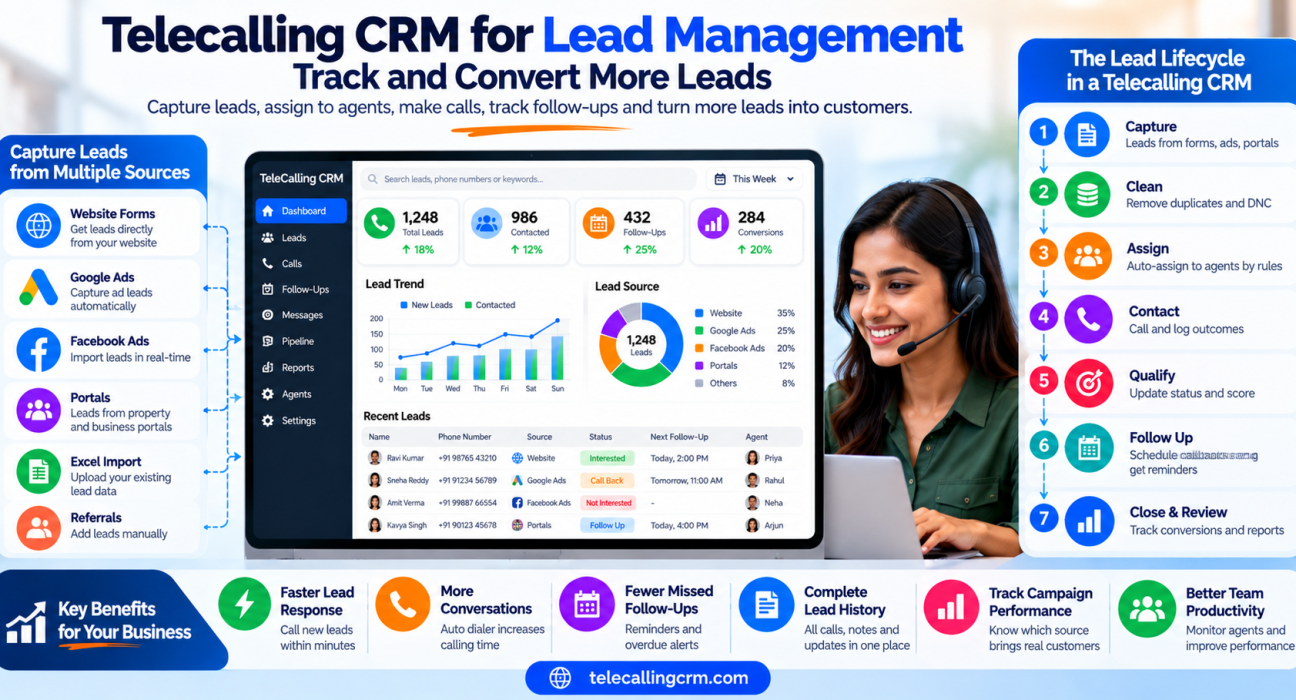
Telecalling CRM for lead management is software that captures leads from different sources, assigns each one to an agent, supports calling, records every outcome and schedules follow-ups. The result is one record per lead, with an owner, a call history and a clear next step.
It goes beyond a spreadsheet because calling is part of the same system. Agents dial, talk, log the result and set a callback without switching tools. You may also see it called a telecaller CRM or lead follow-up software.
Where Lead Management Breaks Down
Most teams lose leads in the same places:
- Scattered data: leads arrive through ads, portals, forms and referrals, and land in different sheets.
- Duplicates: two agents call the same person, or an old lead is treated as new.
- Slow assignment: leads wait for someone to allocate them manually.
- Forgotten callbacks: “call me tomorrow” lives only in memory.
- No history: a new agent has no idea what was discussed earlier.
- No source tracking: marketing cannot tell which campaign produces real conversations.
Each of these can be reduced with clear rules and the right system.
The Lead Lifecycle in a Calling CRM
| Stage | What happens | What to look for |
|---|---|---|
| 1. Capture | Leads arrive by import, form or integration | Source recorded on every lead |
| 2. Clean | Duplicates and DNC numbers are flagged | De-duplication and DNC checks |
| 3. Assign | The lead goes to an agent by rule | Round-robin, language or fixed owner |
| 4. Contact | The agent calls and logs duration and outcome | Auto dialer and one-tap outcomes |
| 5. Qualify | Status, score and notes are updated | Lead scoring and custom fields |
| 6. Follow up | A callback is scheduled and reminded | Reminders and overdue alerts |
| 7. Close and review | The stage is updated and reports are checked | Pipeline stages and funnel reports |
Features of Telecalling CRM for Lead Management
- Multi-source capture: CSV or Excel import, web forms and direct integrations with ad platforms and portals reduce manual uploads.
- Duplicate and DNC handling: duplicates are caught on import, and Do Not Call numbers are flagged before agents dial.
- Assignment rules: leads go to agents by round-robin, language match or a fixed owner. Better tools assign only to agents who are on shift.
- Scoring and priority: hot, warm and cold labels, plus high, normal and low priority, help agents call the best leads first.
- Lead timeline: call history, notes, source and stage changes sit on one screen.
- Follow-up tools: one-tap callbacks, reminders and overdue alerts keep leads from slipping.
- Pipeline stages: custom stages with deal values show where leads get stuck.
- Reports: source performance, conversion funnel and agent comparison show what works.
For more detail on each area, see our buying checklist.
How to Set Up Telecalling CRM for Lead Management
Software helps only when your rules are clear. Follow these six steps:
- Define lead statuses. Keep them few and meaningful, such as New, Contacted, Interested, Follow-up, Booked, Won and Lost. Adapt the names to your industry.
- Define call outcomes. Use a short list: interested, call back, not interested, wrong number and not reachable.
- Agree what a “hot” lead means. For example, a stated budget, a clear timeline or a request for a visit or demo.
- Set assignment rules. Decide who gets which leads by language, product, location or round-robin.
- Set a response target. For example, “every new lead is called within 15 minutes during working hours.” Choose a target your team can meet.
- Review weekly. Check unassigned leads, overdue follow-ups, lost reasons and source performance, and adjust the rules.
Clean your data before importing, and train agents to log every call. Reports are only as good as the data behind them.
Lead Metrics to Track
| Metric | What it shows |
|---|---|
| First response time | How fast new leads are contacted |
| Connection (answer) rate | How many calls reach a person |
| Follow-up completion | Whether promised callbacks happen |
| Stage-to-stage movement | Where leads get stuck |
| Source-wise conversion | Which channels bring real prospects |
| Lost reasons | Why leads drop out |
Compare these against your own baseline, not against generic benchmarks. For more on dashboards, read our post on live monitoring and reports.
Practical Examples
These are hypothetical examples to show how the process may look.
Real estate. A broker receives enquiries from portals and Facebook ads. Each lead carries its source, goes to an available agent and is called quickly. The agent notes budget and location, then sets a site-visit reminder. See our guide on property enquiries and follow-ups.
Education. An admissions team assigns enquiries by language and course. Counsellors record the parent’s concerns. If a call is not answered, the follow-up is rescheduled and a WhatsApp message with fee details is sent. See Education CRM.
Insurance. An agency separates fresh leads from renewals. Agents call policyholders before expiry, and managers review recordings to improve objection handling. See what insurance teams gain from calling software.
Limitations and Mistakes to Avoid
- A CRM cannot fix poor lead quality, a weak offer or untrained agents.
- Too many statuses confuse agents and corrupt reports.
- Importing dirty data brings duplicates and wrong numbers into the system.
- Not reviewing overdue follow-ups lets leads quietly die.
- Calling the same lead too often hurts trust and may breach preference rules.
- Commercial calling in India is governed by TRAI’s Telecom Commercial Communications Customer Preference Regulations, 2018. DNC and calling-hour controls can help, but compliance remains your responsibility.
How TeleCalling CRM Handles Lead Management
Based on its website, TeleCalling CRM includes these capabilities:
- Bulk CSV or Excel import with automatic de-duplication, plus DNC checks
- Assignment rules by round-robin, language match or fixed agent, with availability awareness
- Hot, warm and cold scoring, priority levels, tags, custom fields and capture forms
- A lead timeline with call history, notes and source
- Follow-up scheduling with reminders, smart timing and overdue alerts
- 12+ lead-source integrations, including Facebook and Instagram Lead Ads, Google Ads, 99acres, MagicBricks and JustDial
- A sales pipeline with custom stages, deal values and stage-change history
- Conversion funnel, source performance and agent comparison reports
- An auto dialer, encrypted call recording and an Android and iOS app
Per its pricing page, Basic is ₹999 per month for up to 5 users and Pro is ₹1,599 per month for up to 10 users, excluding GST. The website also mentions a 3-day free trial. Check the features page against your needs, and confirm with the team if you need inbound routing or IVR, which are not listed.
FAQs: Telecalling CRM for Lead Management
What is telecalling CRM for lead management?
It is software that captures leads, assigns them to agents, supports calling, logs outcomes and schedules follow-ups. Each lead has one record with an owner, history and next step.
How does a calling CRM track leads?
It stores each lead with its source, status, score, notes, call history and follow-ups. Managers can view leads by stage, agent or source, and see which ones are overdue.
Can it capture leads from Facebook and Google Ads?
Many tools support this through direct integrations. TeleCalling CRM lists Facebook and Instagram Lead Ads and Google Ads among its integrations. Verify that your exact sources are supported before buying.
How does lead scoring work?
Leads are labelled hot, warm or cold, or given a priority, based on rules or agent input. Agents then call the most promising leads first. Define what “hot” means for your business.
Does it help remove duplicate leads?
Yes, most tools check for duplicate numbers on import. Test this with your own messy file, because duplicate handling varies between products.
Can small teams use it?
Yes. Even a team of three to five agents can lose leads to missed callbacks and scattered notes. Choose a simple tool with clear pricing.
Does it guarantee more conversions?
No. It can support better conversions through faster response and consistent follow-ups, but results also depend on lead quality, offer and agent skills.
Conclusion
Telecalling CRM for lead management works best when your rules are clear: defined statuses, simple call outcomes, fair assignment and regular reviews. The tool then keeps every lead visible, so follow-ups happen and problems show up early.
If you want to test this with your own leads, you can look at the telecaller CRM plans and start with the trial.