How to Manage Field Teams Without WhatsApp and Spreadsheets
If your day starts with checking a WhatsApp group and ends with merging five Excel sheets, you already know the problem. Field teams are hard to manage with tools that were never built for field work. Field team management software replaces those scattered tools with one system for attendance, visits, tasks, routes, proof and reports.
This guide explains why WhatsApp and spreadsheets stop working as a team grows. It also shows how to move to a proper system in six practical steps, and what to look for when you choose one.
What Is Field Team Management Software?
Field team management software is a platform that helps businesses assign work to field employees, track their location and attendance, verify visits, and measure performance from one dashboard.
Typically, it has a mobile app for field staff and a web console for managers. Both work from the same live data. As a result, managers see what is happening in the field as it happens, instead of hearing about it at the end of the day.
You may also see it called field force management software or field workforce management software. The terms overlap heavily, and each one covers the same core job: running people who work outside the office.
Why WhatsApp and Spreadsheets Stop Working
WhatsApp and Excel are familiar, fast and free. That is exactly why teams start with them. However, they fail in predictable ways once you manage more than a handful of people.
1. You Cannot See Where Anyone Is
A WhatsApp location share shows one moment for one person. Moreover, it depends on the employee remembering to send it. Managers end up calling reps to ask where they are, which wastes time on both sides.
2. There Is No Proof a Visit Happened
A message saying “visit done” is not evidence. Photos sent in a group get buried within minutes. Consequently, disputes about missed visits or fake check-ins are hard to settle.
3. Attendance Is Easy to Manipulate
Attendance on paper or in a sheet relies on trust. Similarly, a screenshot of a punch-in can be edited or sent from the wrong place. Without server-side timestamps and location checks, you cannot verify anything.
4. Data Lives in Too Many Places
Tasks sit in chat threads. Expenses sit in one sheet, collections in another, and leave requests in someone’s inbox. Therefore, building even a simple weekly report means copying data by hand, and errors creep in.
5. Nothing Scales
A group of five reps is manageable. A team of fifty across several cities is not. Meanwhile, every new person adds more messages, more sheets and more chances for something to be missed.
6. Managers Cannot Coach With Data
Without clean data on visits, response times and route coverage, you cannot tell which reps or territories perform well. Coaching then depends on opinion instead of evidence.
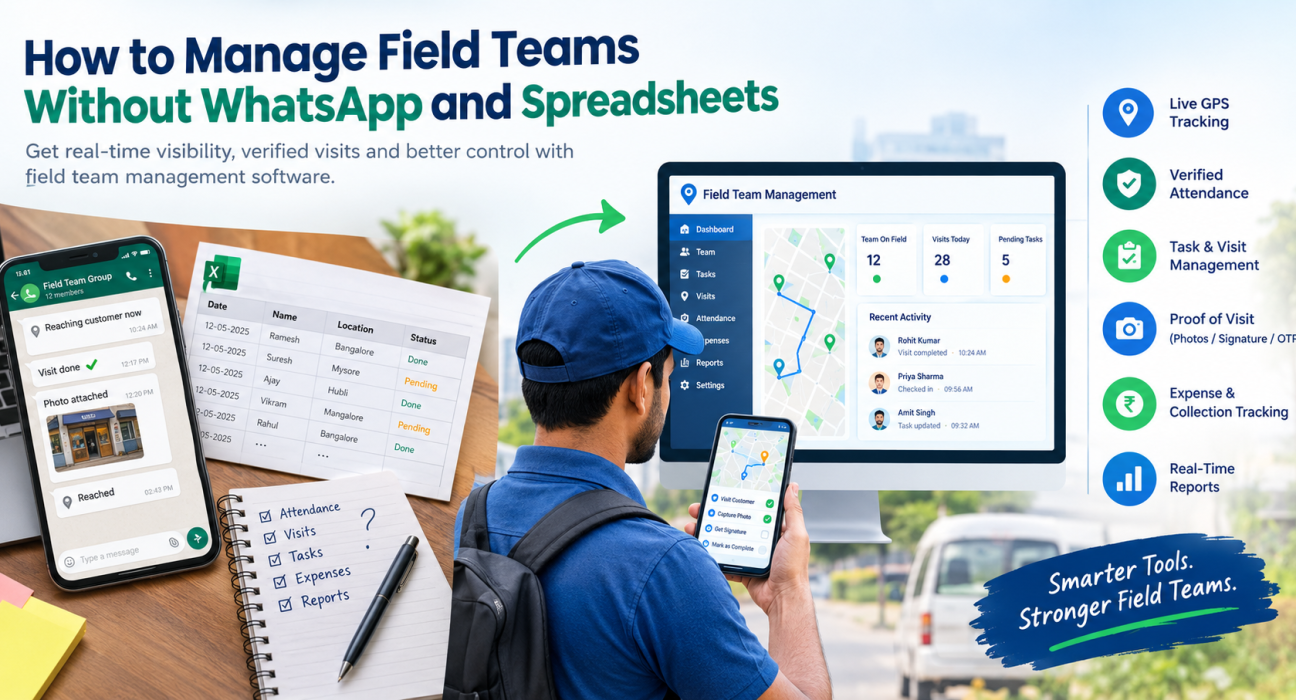
WhatsApp and Spreadsheets vs Field Team Management Software
| Need | WhatsApp + Spreadsheets | Field Team Management Software |
|---|---|---|
| Live team location | Manual location shares | Live map with GPS trail |
| Attendance | Sheets or screenshots | Geofenced, server-time punch-in |
| Task assignment | Chat messages | Tasks with checklists, priority and SLA |
| Proof of visit | Photos in a group | Photo, signature or OTP captured in the job |
| Expenses | Paper bills and sheets | Receipt-backed claims with approvals |
| Reporting | Manual, end of week | Real-time dashboards and KPIs |
| Offline work | Depends on network | Capture offline, sync later |
How to Move Your Field Team Off WhatsApp and Spreadsheets
You do not need to change everything in one day. Follow these six steps for a smooth switch.
- List what you track today. Note every process that runs on chat or sheets, such as attendance, visits, tasks, expenses and collections.
- Define what “done” means. Decide what proof each job needs, for example a photo, a signature or a customer OTP.
- Set up your structure. Add users, roles, reporting hierarchy and territories so that each manager sees the right team.
- Digitise your forms and workflows. Replace sheet columns with custom forms, checklists and approval steps.
- Train a pilot group first. Start with one team or city. Then fix any friction before rolling out to everyone.
- Retire the old channels. Once the pilot works, move all updates into the app. Otherwise, people will drift back to WhatsApp out of habit.
Features to Look For in Field Team Management Software
Not every tool covers the full field workflow. Some only track location. As you compare options, check for these capabilities.
Live GPS Tracking and Geofenced Attendance
You should see every rep on one map. In addition, attendance should use server time and location checks so that punch-ins cannot be faked.
Task and Visit Management With Proof
Managers should assign visits with checklists and deadlines. Reps should then capture proof before closing a job.
Route and Beat Planning
Good route planning reduces wasted travel. It also helps reps fit more customer visits into the same day.
Expense and Collection Tracking
Field money should not live in a spreadsheet. Look for receipt-backed expense claims, approval workflows and collection tracking.
Offline-First Mobile App
Network coverage is uneven in many areas. Therefore, the app should let reps work without internet and sync once they reconnect.
Custom Forms and Workflows
Every business runs differently. Custom forms, job types and approvals let you shape the tool around your process instead of the reverse.
Real-Time Reporting
Dashboards and KPIs turn field activity into decisions. For example, you can spot missed visits the same day rather than at month end.
How FieldExecutives Helps You Manage Field Teams
Businesses looking to simplify these processes can use field force management software such as FieldExecutives. It is built for teams that work outside the office, and it covers the workflow described above in one platform.
According to the FieldExecutives website, the platform includes:
- Live map and GPS tracking: every rep, route and visit on a single real-time map, with a GPS breadcrumb trail.
- Geofenced attendance: server-time punch-ins with geofence enforcement and mock-location detection.
- Task and visit execution with proof: guided job cards with checklists, plus photo, signature and OTP capture.
- AI route and beat-plan optimisation: the site states that this can cut 20–30% of travel time, though these figures are illustrative rather than guaranteed.
- Expenses and collections: receipt-backed expense claims with approvals, and collection-to-settlement tracking.
- Custom forms and workflows: configurable job types, forms, checklists and SLAs without code.
- Offline-first mobile app: reps can work without a network and sync later.
The platform runs as three connected apps: a mobile app for field executives, a web console for managers, and an admin portal for business owners. Because all three share one real-time backend, everyone works from the same data.
FieldExecutives also lists a free start and a 14-day free trial, so you can test it with a small pilot group before committing.
Internal Link Opportunity: Explore FieldExecutives features
Best Practices for Managing Field Teams With Software
Software helps most when it comes with clear habits. These practices make the switch stick.
- Explain the “why” to your team. Reps adopt tools faster when they see less paperwork and quicker reimbursements.
- Be transparent about location tracking. Tell staff that tracking applies to duty hours only, and put this in writing.
- Keep forms short. Long forms slow down visits and lower data quality.
- Review dashboards daily. A quick morning check on attendance and pending tasks prevents small gaps from growing.
- Use data for coaching. Share visit and SLA trends with reps in one-to-one reviews.
- Start small, then expand. A pilot builds confidence and surfaces problems early.
Which Teams Benefit Most?
Any business with people working outside the office can benefit. Common examples include FMCG and distribution, pharma and medical reps, field service and repair, logistics, banking and collections, and facility management. Each of these runs on visits, proof and timing, which is where chat groups and sheets fall short.
For example, an FMCG team needs beat plans and order capture, while a service team needs SLA timers and job proof. You can explore industry-specific pages on FieldExecutives to see how the workflows differ.
Conclusion
WhatsApp and spreadsheets are a reasonable starting point. However, they cannot give you live visibility, verified visits or reliable reports once your field team grows. The gaps show up as missed visits, unclear attendance, delayed expenses and reports that take hours to build.
Field team management software solves this by putting attendance, tasks, tracking, proof, expenses and reporting in one place. Start by listing your current processes, pilot with one team, and retire the old channels once the new system works.